I treat data wiping as one step - not proof of ITAD compliance. Before you release equipment, require a record linking each drive to its sanitization method, verified result, approval, and final destination.
I use 3 choices - Clear, Purge, or Destroy - based on the data, drive type, condition, and planned use. HDDs, SSDs, and NVMe drives need different treatment; an ordinary overwrite may miss stored data on flash drives.
My checklist is simple:
Check applicable U.S. laws, contracts, California rules, and current NIST and IEEE guidance.
Track each device through every handoff.
Verify results and hold failed or uncertain drives for correction or approved destruction.
Check the provider’s service and certification scope, including Rica Recycling’s claims, fees, and reporting.
A certificate alone is not enough. I look for device-level records that show what happened - and who approved release.
Choose Clear, Purge, or Destroy
Base your choice on data sensitivity, media type, intended destination, and custody status.
Selecting a method is a compliance decision - not a matter of convenience. After choosing one, document its execution and the custody of each device. Wiping alone isn't enough; verification comes next.
Compare Clear, Purge, and Destroy
NIST method | Technical approach | Suitable media and risks | Disposition outcome | Verification requirements |
|---|---|---|---|---|
Clear | Logical sanitization of user-addressable locations through standard interfaces | Lower-risk, controlled use; may miss remapped or hidden areas | Reusable | Record device identity, method, tool/version, operator, date, and results; investigate errors |
Purge | Technology-specific sanitization intended to defeat advanced forensic recovery | Media leaving organizational control for reuse; requires device-supported methods | Reusable | Confirm support for the exact device; retain the command, device response, verification evidence, exceptions, and reviewer approval |
Destroy | Hard drive shredding makes recovery infeasible and prevents storage use | Failed, unsupported, damaged, or unverifiable media, or media holding highly sensitive data | Not reusable | Record serial number, method, date, witness or vendor, destruction certificate, and final disposition route |
Software wiping is a method, not proof of success. Regardless of tool certification, verify the selected device, supported operation, completion status, and recorded result.[4][6]
Choose the method for the media - not for the label on the software.
Match Methods to HDDs, SSDs, and NVMe Drives
For HDDs, use an approved overwrite for Clear or a supported sanitization procedure suited to the device for Purge. Remapped sectors and damaged areas can limit assurance. Degaussing is only for suitable magnetic media - not SSDs or NVMe flash storage - and may leave an HDD unusable.[1][4]
For SATA SSDs and NVMe drives, ordinary overwrites can miss remapped, spare, and overprovisioned areas. Fixed multi-pass overwrites don't reach inaccessible storage, either. Use supported ATA Sanitize, NVMe Sanitize, block erase, or another approved technology-specific operation. Keep completion status and error output, and quarantine drives when operations fail, are interrupted, lack support, or return unclear results.[3][4]
Cryptographic erase requires more than encryption alone. Use it only when all relevant data was encrypted before storage and the encryption meets NIST prerequisites. These include at least 128-bit security strength and suitable random-number generation. Verified key sanitization must also permanently remove the keys and all recovery copies.[1] Without documentation of these conditions, the process doesn't meet purge-level evidence requirements.
If you can't verify the method on the exact device, treat the media as unresolved and send it for approved destruction.[4][7]
Manage Sanitization and Chain of Custody
After choosing a sanitization method, keep the asset under control until electronics recycling and final disposition. Restrict storage, limit access, use secure transport, and document every handoff. Custody records provide audit-ready evidence that the correct device received the selected sanitization and left through a controlled disposition process.
Set Policy and Inventory Devices
Before collection, define custody responsibilities, access controls, retention periods, and exception procedures. Confirm that retention obligations allow disposal.
Inventory every device and storage component by serial number or unique ID, and link it to its custodian. For each collection, transport, receipt, and processing handoff, record timestamps, locations, personnel, quantities, and container condition. Use signed or system-generated handoff records.
If an identifier is unreadable, assign a unique ID, photograph the item, document the reason, and require a second-person check. After inventory, confirm that each sanitization result matches the approved method and media type.
Verify Completion and Validate Results
Verification confirms execution; validation approves suitability. Link verification evidence and errors to each device’s serial number or unique ID. Validation confirms that the method and evidence fit the media, data sensitivity, and destination.
Document exceptions and hold unresolved media in controlled quarantine until an authorized reviewer approves the next action. Investigate missing assets as custody incidents. Require independent review or sampling when policy, contracts, risk, or certification rules call for it.[1][4]
Check R2v3 and NAID AAA Certification Scope
Check that the certification scope covers the exact service assigned. Confirm legal authorization separately.
R2v3 certification is facility- and scope-specific. Core Requirement 7 covers securing data-bearing devices and sanitization. Appendix B adds enhanced sanitization, tracking, records, and security requirements. Check coverage for reuse, testing, repair, and material recovery. If sanitization is outsourced, confirm downstream qualifications and retain transfer and processing evidence.[9]
NAID AAA independently audits specified secure-destruction services. Its coverage includes secure processes, chain of custody, employee background screening, and scheduled and unannounced audits. Review personnel, transport, processing, surveillance, and subcontractor controls.[8]
For either credential, verify current status, facility address, service categories, media types, and whether the service is mobile or facility-based. Do not assume a provider holds either certification without current documentation.
Keep Device-Level Sanitization Records
Certification confirms scope; device-level records prove the result. After sanitization and verification, keep a record for each device that stands on its own. Link every certificate to supporting records, custody logs, verification evidence, and approval decisions so reviewers can trace the work during audits and investigations.
Record Methods, Results, and Final Disposition
For each storage device, record its asset ID, manufacturer, model, serial number, media type, capacity, and source. Include the sanitization category - Clear, Purge, or Destroy - along with the specific technique, tool and version or device command, operator, processing location, and date and time with time zone. Document the result, verification method, verifier, approval decision, and any errors or exceptions.
Link each certificate to individual storage devices - not just batches or shipments. Use the same identifier across inventory, certificates, tool output, custody logs, and final-disposition evidence. Record the device’s final disposition: returned, reused, resold, recycled, or destroyed.
Keep these records in an access-controlled system with audit logs and backups. Document retention periods based on applicable legal, contractual, customer, certification, and organizational requirements. Preserve records under legal holds, and keep them exportable for review.
Compare Strong and Weak Compliance Records
Use this table to check whether a reviewer can reconstruct each record without a verbal explanation.
Control area | Strong documentation | Weak documentation |
|---|---|---|
Certificate linkage | Certificate identifies each storage device and links to supporting records. | Batch-level wipe claim with no device evidence. |
Custody history | Timestamped handoffs tie each device serial number to its final disposition. | Missing transfers or unexplained transport gaps. |
Results and approval | Retained tool output, verification findings, and approval decision. | Wiped status without technical evidence or approval. |
Unreadable or damaged media | Condition, failed attempt, assessor, escalation approval, and destruction evidence where applicable. | Damaged media marked complete without explanation. |
Encrypted or unsupported media | Documented basis for accepting cryptographic erase, or rejection and an approved alternate method. | Encryption treated as proof of sanitization; unsupported commands ignored. |
Final disposition | Device-level record of return, reuse, resale, recycling, or destruction. | Batch-level recycled label with no device-level outcome. |
Complete the ITAD Release Process
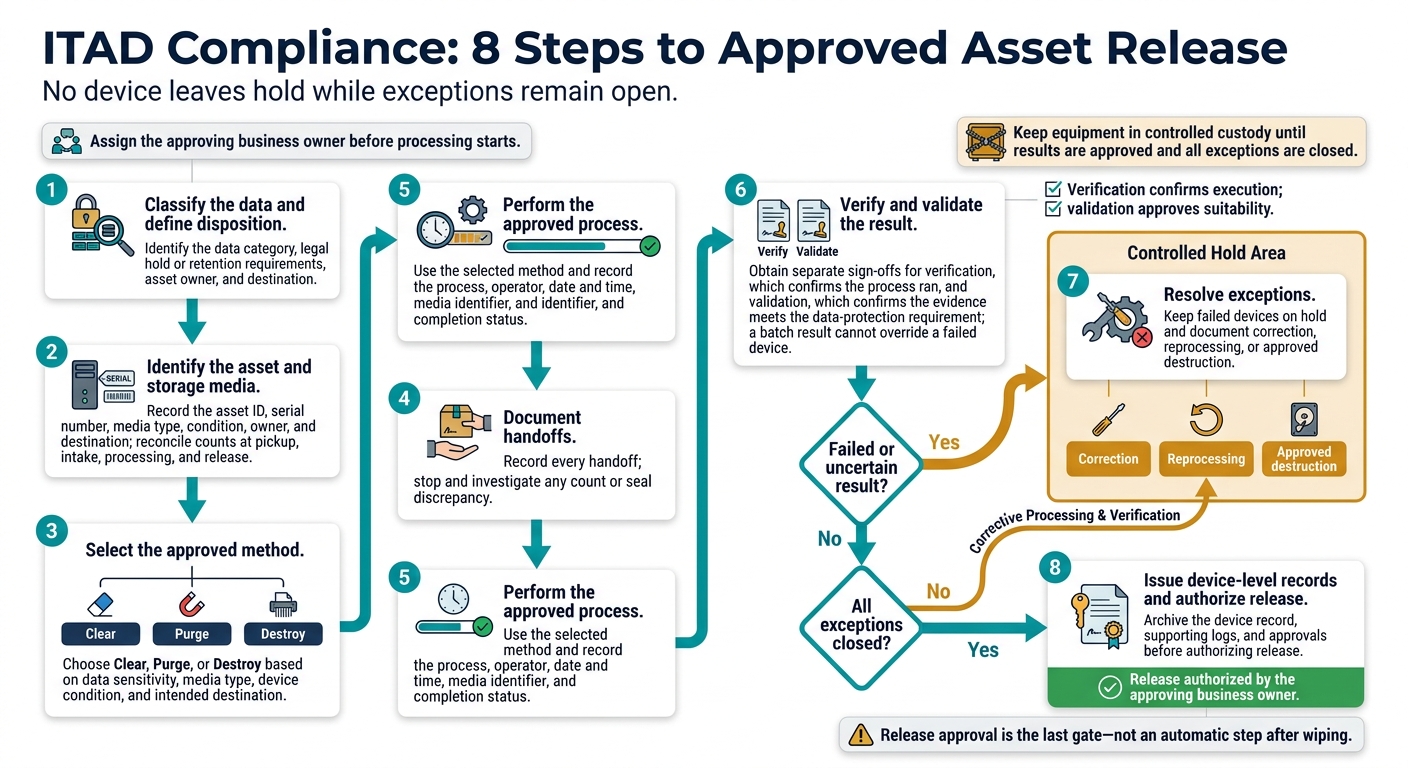
ITAD Compliance: 8 Steps to Approved Asset Release
Follow the ITAD Compliance Checklist
Once device-level records are complete, release approval is the last gate - not an automatic step after wiping. Assign the approving business owner before processing starts. Keep equipment in controlled custody until that owner approves the results and closes all exceptions.
Follow this sequence for each asset. No device leaves hold while exceptions remain open.
Classify the data and define disposition. Identify the data category, legal hold or retention requirements, asset owner, and destination.
Identify the asset and storage media. Record the asset ID, serial number, media type, condition, owner, and destination; reconcile counts at pickup, intake, processing, and release.
Select the approved method. Choose Clear, Purge, or Destroy based on data sensitivity, media type, device condition, and intended destination.
Document handoffs. Record every handoff; stop and investigate any count or seal discrepancy.
Perform the approved process. Use the selected method and record the process, operator, date and time, media identifier, and completion status.
Verify and validate the result. Obtain separate sign-offs for verification, which confirms the process ran, and validation, which confirms the evidence meets the data-protection requirement; a batch result cannot override a failed device.
Resolve exceptions. Keep failed devices on hold and document correction, reprocessing, or approved destruction.
Issue device-level records and authorize release. Archive the device record, supporting logs, and approvals before authorizing release.
Confirm Services With Rica Recycling
If a provider handles pickup or asset recovery, confirm its scope in writing before release.
Rica Recycling describes its San Francisco Bay Area services as electronics pickup and drop-off, secure data destruction, and IT asset recovery.[10][11][13] It also states that it follows California e-waste requirements and operates a 100% landfill-free policy.[11][12][14] Treat these statements as provider claims unless current certification documents prove otherwise.
Before scheduling, get written confirmation of the methods used for each media type, processing locations, transport and custody controls, subcontractor involvement, and handling of failed or damaged devices. Request a sample device-level certificate, confirm reporting and turnaround time, and identify who authorizes release.
Ask for a current, itemized quote covering pickup, sanitization or destruction, certificates, asset recovery credits, and special handling fees. Don’t assume every service is included. If certification is required, verify that it is current and covers the facility and services you plan to use before relying on it for compliance.
Conclusion: Match Methods to Risk and Keep Records
Choose Clear, Purge, or Destroy based on data sensitivity, media type, device condition, and disposition. Review approved techniques whenever encryption, media, standards, or contract terms change.[2][5]
Keep the chain of custody traceable through final disposition. Hold any device with a failed or uncertain sanitization result until corrective action closes the exception. Retain the audit trail for the required period.[4]
Certificates support the record, but device-level evidence proves sanitization. The record must link each device to its method, verified result, validation decision, and final disposition.[4][15]
FAQs
How do I determine which ITAD rules apply to my organization?
Start by assessing how sensitive your data is and which industry requirements apply, such as HIPAA, GLBA, PCI DSS, or FERPA. Check state requirements, too, including California’s e-waste laws and CCPA/CPRA privacy mandates.
NIST SP 800-88 Rev. 2 is a technical baseline - not a legal mandate. Work with legal or compliance advisors to choose data sanitization methods that meet your statutory and contractual obligations.
How long should I keep data sanitization records?
Keep data sanitization records for the periods set by your information-governance policies, legal holds, and regulatory requirements. HIPAA requires six years for destruction documentation; CCPA/CPRA requires 24 months. Many organizations follow a five- to seven-year retention period as a best practice.
Keep records searchable and linked to each asset until its final disposition is closed. Maintain a clear audit trail from initial collection through the final, verified outcome.
What evidence should I request before an ITAD audit?
Request itemized records that link each asset’s serial number to its sanitization history. Batch summaries or certificates without serial numbers aren’t enough. Records should include:
Device inventories and sanitization certificates documenting NIST 800-88 methods and verification results
Signed chain-of-custody records
Retention and legal hold clearances
Exception logs with corrective actions
Keep these records in a central, access-controlled, searchable repository for the period required by internal policies, contracts, and applicable federal or state regulations.