
Checklist for Starting a School E-Waste Drive
I’d start a school e-waste drive 30–90 days before collection, with school approval, a recycler, and a written plan for protecting data.
Here’s the checklist I’d use:
Get approval and confirm recycling plans: Assign staff roles, set a goal and date, and confirm Rica Recycling’s accepted items, fees, pickup arrangements, and records.
Set collection rules and prepare the site: Arrange secure storage and accessible drop-off routes. Keep data-bearing devices under staff control and leave heavy or damaged items to adults.
Promote and run the drive: Share one approved notice 1–2 weeks ahead, explain device preparation, brief volunteers, and count devices or weigh loads in pounds.
Document and close: Check pickup receipts, track school assets separately, collect required data-destruction records, clean the site, and share only verified totals.
My final check: <u>collection alone doesn’t finish the job</u>. I’d keep the drive open until every item is accounted for and required records are received. Deleting files isn’t enough - district IT should confirm the data-sanitization or destruction process.
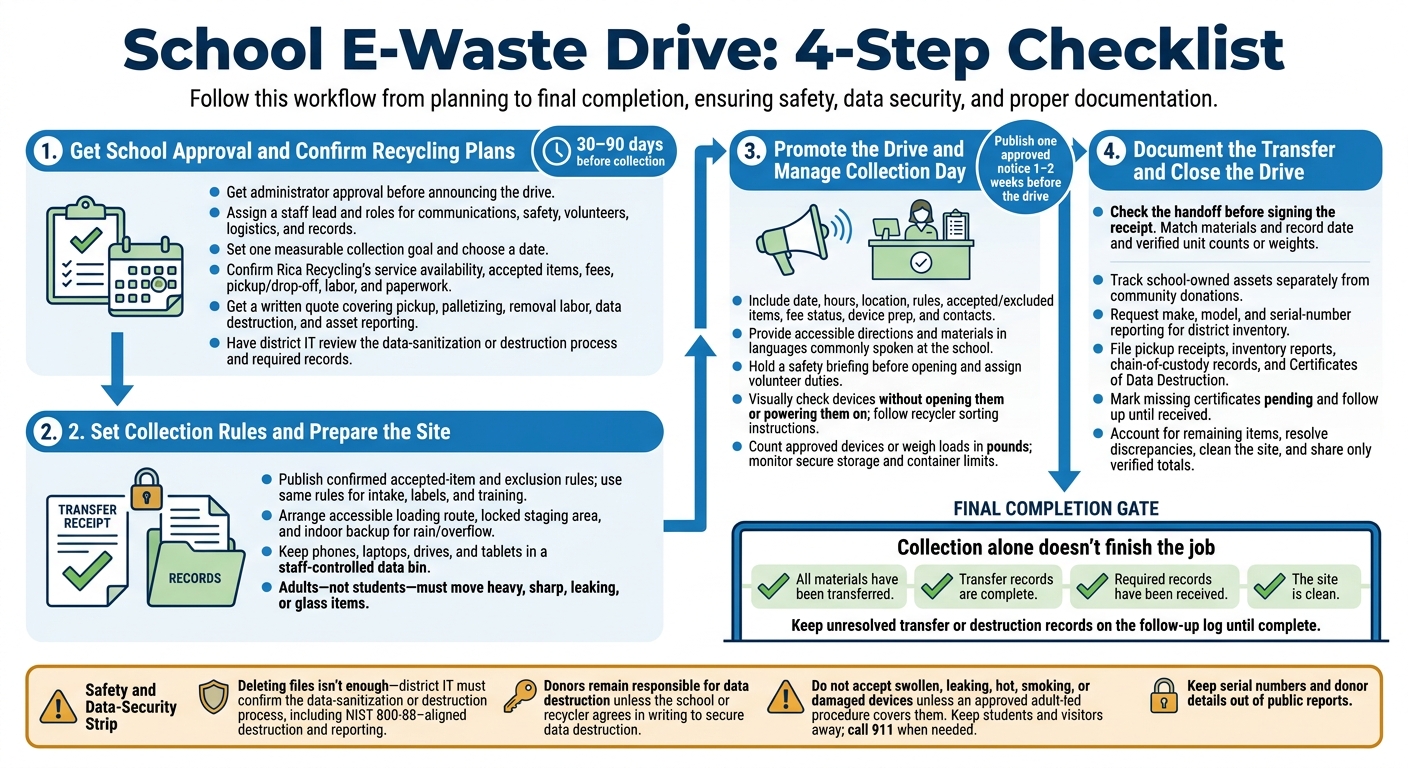
School E-Waste Drive: 4-Step Checklist
1. Get School Approval and Confirm Recycling Plans
Begin planning 30 to 90 days before collection to get approvals and coordinate with district IT and facilities.[1] Get administrator approval before announcing the drive. Educating the community on the problems of electronic waste can help increase participation. Then assign roles and confirm the date.
Assign Roles, Set Goals, and Choose a Date
Choose a staff lead and divide responsibility for communications, safety, volunteers, logistics, and records. Set one measurable collection goal, and pick a date that avoids school calendar conflicts.
Arrange Pickup or Drop-Off With Rica Recycling
Contact Rica Recycling to confirm service availability, accepted items, and pickup or drop-off arrangements. Share estimated counts and device types so everyone knows what’s approved and how collection will work. Confirm pickup labor requirements and any paperwork or written agreement you’ll need.[1]
Ask about certifications, the 100% landfill-free policy, and downstream processing. Have district IT review the data-destruction process to verify that it meets NIST 800-88 and FERPA requirements. Request chain-of-custody records, a certificate of data destruction, and reporting that includes each device’s make, model, and serial number for inventory updates.[1] Use these details to finalize the budget and collection schedule.
Check Fees and Set a Budget
Confirm current appliance-recycling pricing and eligibility before publishing fees.[4] Get a written quote covering pickup, palletizing and removal labor, data destruction, and asset reporting. Pickup pricing depends on volume, the number of locations, and labor. Newer equipment may qualify for buyback credits.[1]
Include signs, protective supplies, containers, and a contingency line in the budget.
2. Set Collection Rules and Prepare the Site
Identify Accepted and Restricted Items
Use this intake list at check-in, then use the same rules to label bins, train volunteers, and sort devices.
Material Category | Status | Handling Notes |
|---|---|---|
Computers & Laptops | Accepted | Label as data-bearing and keep separate for secure handling. Confirm buyback eligibility. |
Monitors & TVs | Accepted | Store upright and protect screens from breakage. Confirm CRT quantity limits. |
Mobile Devices | Accepted | Label as data-bearing and keep separate for secure handling. Confirm whether loose batteries are accepted. |
Printers & Scanners | Accepted | Bag or tape ink and toner to prevent leaks. |
Servers & Networking | Accepted | Set aside for certified data destruction. Confirm pickup arrangements for heavy racks. |
Cables & Accessories | Accepted | Bundle or bag to prevent tangling. |
Appliances | Restricted | Confirm whether lamps are excluded. |
Hazardous Waste | Restricted | Confirm where to recycle your electronic waste and local hazardous waste drop-off sites. |
Protect Data and Set Student Safety Rules
Place all phones, laptops, drives, and tablets in a staff-controlled data bin for certified data destruction.
Adults - not students - must move heavy, sharp, leaking, or glass items. Students must not handle heavy devices, damaged items, or anything with leaking batteries.
Assign these rules before collection day to avoid delays at intake.
Plan Site Access, Storage, and Backup Options
Set up a clear, accessible loading route and entrance, a locked staging area, and a backup indoor space for rain or overflow.
3. Promote the Drive and Manage Collection Day
Once approval and site prep are complete, focus on getting the word out and running collection day safely.
Share Event Details and Device Preparation Steps
Publish one approved notice 1–2 weeks before the drive. Repeat that message in newsletters, classroom announcements, the school website, social posts, and flyers.
Include the exact date, hours, location, who may participate, accepted items, exclusions, and fee status. Add drop-off instructions and contact details. Before publishing, confirm accepted items, exclusions, and fee status with Rica Recycling.[6][8]
Add a before you arrive reminder that directs donors to follow the earlier data-prep rules. School-owned devices must follow district procedures. State in writing who handles data destruction: donors remain responsible unless the school or recycler has agreed in writing to secure data destruction.[5][11]
Provide plain-language instructions in languages commonly spoken at your school, along with large-print materials and screen-reader-friendly digital materials. Include accessible drop-off directions and a contact for accommodation requests.
Use a short classroom reminder about reuse, data removal, and responsible recycling to help families prepare devices correctly before arrival.
Brief Volunteers and Sort Incoming Devices
On collection day, use the same approved message at check-in to keep intake moving.
Hold a safety briefing before opening. Review traffic flow, safe lifting, emergency contacts, first-aid and fire-extinguisher locations, weather backup plans, and the adult lead’s authority to stop work. Assign duties for greeting, unloading, sorting, records, bin monitoring, and cleanup. Give supervised students simple tasks, such as handing out instructions, greeting donors, or counting approved items.[9]
At intake, visually check each device without opening it or powering it on, then follow the recycler’s sorting instructions. Set a clear process for questionable items and refer uncertain devices to the adult lead. Do not accept swollen, leaking, hot, smoking, or damaged devices unless an approved adult-led procedure covers them. Keep students and visitors away, and call 911 when needed.[10]
Monitor containers throughout collection. Stop accepting material before containers become unstable, block exits, or exceed the recycler’s limits. Keep devices in the designated secure area, and have a backup plan if the volume exceeds the original estimate.[7]
4. Document the Transfer and Close the Drive
Once collection ends, close the chain of custody and finish cleaning the site.
Track Transfers and Confirm Data Destruction
Check the handoff before signing the receipt. Match the accepted materials against Rica Recycling’s pickup receipt, then record the transfer date and unit counts or weights. Track school-owned assets separately from community donations. Request make, model, and serial-number reporting to update district inventory.[1]
Store pickup receipts, inventory reports, and chain-of-custody records in the district’s approved record system for inventory and compliance. For covered equipment, file the Certificate of Data Destruction when it arrives.[1] Mark missing certificates as pending until you receive them.
Include only verified results in the school’s final transfer log. Keep serial numbers and donor details out of public reports.
Device Category | Quantity or Weight | Source | Transfer Date | Records Received |
|---|---|---|---|---|
Laptops/Chromebooks | Verified unit count | School district | Actual handoff date | Receipt, asset report; Certificate of Data Destruction when received |
Monitors | Verified weight in lbs | School or community, tracked separately | Actual handoff date | Pickup receipt; applicable transfer records |
Tablets | Verified unit count | School district | Actual handoff date | Chain-of-custody, asset report; Certificate of Data Destruction when received |
Cables/peripherals | Verified weight in lbs | School or community, tracked separately | Actual handoff date | Pickup receipt |
Clean the Site and Review Collection Results
Account for every remaining item before closing the site. Confirm that all electronics have either been transferred or placed in approved secure storage. Work with the collection lead to resolve count differences, and follow up on items still awaiting pickup. Before returning supplies and removing signs, have an adult check for leaking batteries or broken CRT glass.
Share verified totals, thank volunteers, and record lessons learned. Keep unresolved transfer or destruction records on the follow-up log until they’re complete. File the records and clear the site before the drive’s final review.
Conclusion: Final School E-Waste Drive Checks
Before collection day, confirm school approval, district IT involvement, Rica Recycling’s services and fees, and the posted collection rules. Make data security part of the final check: district IT must confirm NIST 800-88–aligned destruction and reporting.
The drive is complete only when all materials have been transferred, transfer records are complete, required records have been received, and the site is clean. Review the final results before closing the event.
FAQs
How should we prepare devices that won’t turn on?
Devices that won’t turn on can’t undergo a standard software wipe or factory reset. Keep them separate from working equipment and log them in your inventory so you can track their chain of custody until handoff.
Put physical security first. Work with a certified recycler like Rica Recycling for professional data destruction, including shredding or crushing, to make data on nonfunctional drives unrecoverable.
Do we need donor consent for data destruction?
No, donor consent is not needed. Schools must securely destroy devices that contain sensitive information to comply with regulations such as FERPA.
Professional IT asset disposition (ITAD) services, such as Rica Recycling, use certified methods - software wiping, degaussing, or physical shredding - to make the data unrecoverable.
For compliance and audit readiness, request a serialized Certificate of Data Destruction for each device. This document confirms that the device’s data was permanently erased or destroyed.
What if our collection totals don’t match the pickup receipt?
Contact your recycling partner right away to review the chain-of-custody documentation [1]. Compare your internal inventory with your partner’s final processing reports to resolve differences and account for every piece of equipment [3][1].
Accurate records that track devices from purchase through retirement help you spot discrepancies [2]. Rica Recycling’s detailed reports include make, model, and serial number verification, helping schools keep accurate IT records and meet audit requirements [3].