
Why NIST 800-88 Matters for IT Asset Disposal
Before I retire a device, I need to confirm its data cannot be recovered - not just delete its files. NIST SP 800-88 Revision 2, published September 26, 2025, guides that process through three methods: Clear, Purge, and Destroy.
Here’s my checklist before a device leaves my control:
Check every storage component and resolve retention rules and legal holds.
Choose the right method based on the data, media condition, recovery risk, and destination. Check encryption and keys before relying on cryptographic erase.
Verify the work and approve the result. Keep failed or unresolved devices out of reuse and recycling.
Track custody and records so each device links to its method, result, approval, and final destination.
Review the provider’s process. NIST does not certify providers, and following its guidance does not replace legal or contract duties.
My rule: <u>no release until the sanitization result is accepted and documented</u> - including storage inside printers and copiers.
NIST SP 800 88 Revision 2: Media Sanitization Guidelines
What NIST SP 800-88 Covers
NIST defines media sanitization as making target data infeasible to recover at a specified level of effort before reuse, resale, recycling, or final disposal. The test is whether the method defeats the expected recovery capability - not whether files look deleted. NIST also guides organizations on selecting, implementing, verifying, validating, and documenting sanitization.[2][4] The next step is to match the method to the media and its final destination.
NIST covers sanitization, not the full ITAD lifecycle. Ownership, retention, legal holds, transport, environmental handling, and final disposition need separate controls. Following NIST guidance does not automatically satisfy HIPAA, FERPA, GLBA, state privacy laws, or contract requirements. Each obligation needs its own review.[2][4]
Revision 2 Is the Current Edition
NIST SP 800-88 Revision 2, published on September 26, 2025, supersedes Revision 1. Use this edition when writing ITAD sanitization procedures. It retains Clear, Purge, and Destroy and updates program guidance, cryptographic-erase guidance, and verification and validation expectations. Base procedures on Revision 2 and its referenced standards, including IEEE 2883.[2][4][6]
NIST does not certify providers. A claim of “NIST compliant” is a reason to review the provider’s sanitization procedures, equipment, verification practices, and reporting - not a substitute for that review.[4]
How Leftover Data and Custody Gaps Create Risk
Deletion, quick formatting, and factory resets may leave customer records, student information, credentials, and business files in hidden partitions, unallocated space, or SSD remapped areas. Computers, servers, mobile devices, and removable media each need a media-specific assessment. A failed drive is not safe just because it no longer mounts.[2][5]
Incomplete sanitization leaves recoverable data behind. Custody and documentation gaps also need controls:
Risk or gap | Practical control |
|---|---|
Unknown storage components or encryption state | Inventory each device, confirm its encryption state, and match the method to the media, data, and destination. |
Recoverable remnants after deletion, formatting, or reset | Use a suitable Clear, Purge, or Destroy method instead of relying on ordinary deletion or formatting. |
Failed or damaged media cannot complete sanitization | Document the failure and send the media for approved physical destruction or another suitable method. |
Uncontrolled handling during collection or transport | Track each asset from collection through final disposition. |
Sanitization fails or its result cannot be verified | Quarantine the media. Do not release it for reuse or recycling just because sanitization was attempted. |
Missing evidence for an individual drive | Link the asset identifier to the method, date, operator or provider, verification result, exceptions, and final disposition. |
Choose Sanitization Based on Data, Media, and Destination
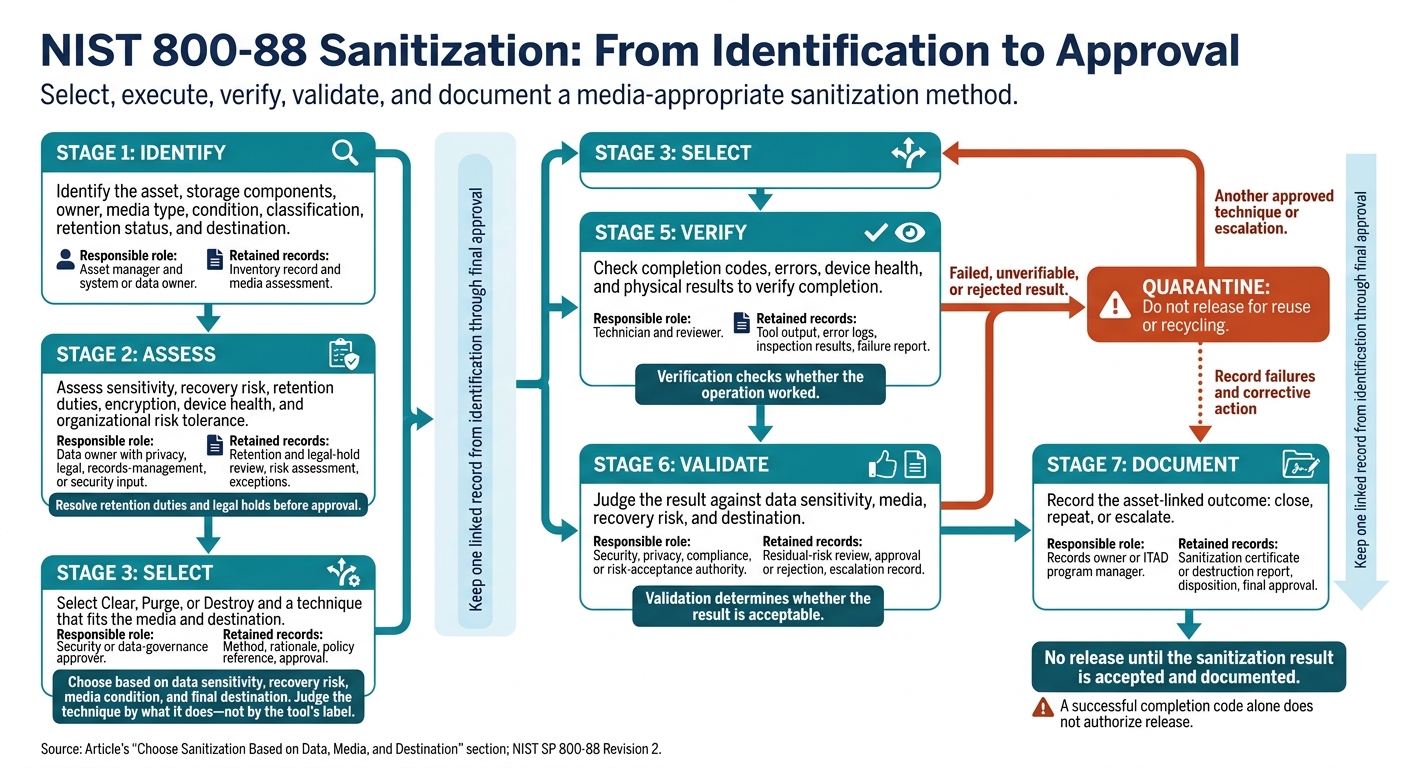
NIST 800-88 Sanitization: From Identification to Approval
Once you’ve identified the risks, choose a sanitization method based on data sensitivity, recovery risk, media condition, and final destination. Clear may be acceptable for internal reuse. Transfer outside organizational control calls for Purge or Destroy.
Document who classified the data, approved the method, performed the work, and reviewed the results.
Inventory Storage Media and Check Retention Rules
For each component, record its asset tag, serial number, make/model, capacity, interface, encryption status, condition, owner, classification, retention status, destination, and sanitization method.
Assess HDDs, SSDs, removable flash media, and damaged devices separately. Flash wear leveling and overprovisioning can leave data beyond the reach of an overwrite. Repeated passes won’t solve that problem.
Before approval, privacy, legal, and records-management staff must resolve retention duties and legal holds. Use the inventory and those reviews to determine whether Clear, Purge, or Destroy fits the asset.
Compare Clear, Purge, and Destroy
Method | Recovery resistance | Reuse potential | Method selection | Required evidence |
|---|---|---|---|---|
Clear | Prevents recovery with ordinary techniques, but not advanced forensic techniques. | Usually preserves reuse. | Choose a suitable logical technique that reaches every user-addressable storage location. | Asset identity, tool and version, command or configuration, completion status, errors, and verification results. |
Purge | Makes recovery infeasible with advanced forensic techniques while potentially preserving the media for reuse. | May permit reuse if the device still works. | Use a media-appropriate sanitize command, block erase, validated cryptographic erase, or another approved logical or physical technique. | Evidence required for Clear, plus media compatibility, technique parameters, device health, error handling, and validation results. |
Destroy | Makes recovery infeasible and prevents further use of the media for storage. | No reuse of the destroyed media. | Use approved physical destruction when sensitivity, media condition, unsupported technology, or failed verification rules out other methods. | Destruction method, equipment details, physical inspection or particle evidence, and destruction report. |
Judge the technique by what it does - not by the tool’s label. Record the selected method in each asset’s sanitization record.
Assess Cryptographic Erase and Damaged Media
Accept cryptographic erase only if encryption protected the target data, the implementation is sound, and all relevant keys are removed or made unrecoverable. Check key hierarchies, escrow or backup copies, and any unencrypted remnants. Keep encryption-state evidence, key identifiers, operation results, and errors.
If cryptographic erase isn’t reliable, move to damaged-media handling and physical destruction.
For inaccessible or damaged media, isolate the device and test whether it can still execute and report sanitization. Don’t repeatedly power on a failing drive. If you can’t verify an acceptable result, use an approved destruction process rather than repeated attempts or assuming a reset succeeded.
Record Each Sanitization Decision
Keep one linked record from identification through final approval. Verification checks whether the operation worked; validation determines whether the result is acceptable for the data, media, recovery risk, and destination.
A successful completion code alone does not authorize release. Failed or rejected results require another approved technique or escalation.
Stage | Decision or action | Responsible role | Retained records |
|---|---|---|---|
Identify | Identify the asset, storage components, owner, media type, condition, classification, retention status, and destination. | Asset manager and system or data owner | Inventory record and media assessment. |
Assess | Assess sensitivity, recovery risk, retention duties, encryption, device health, and organizational risk tolerance. | Data owner with privacy, legal, records-management, or security input | Retention and legal-hold review, risk assessment, exceptions. |
Select | Select Clear, Purge, or Destroy and a technique that fits the media and destination. | Security or data-governance approver | Method, rationale, policy reference, approval. |
Execute | Perform the approved operation and keep execution logs. | Trained technician or approved provider | Operator, tool or equipment, version, command, timestamps, location, logs. |
Verify | Check completion codes, errors, device health, and physical results to verify completion. | Technician and reviewer | Tool output, error logs, inspection results, failure report. |
Validate | Judge the result against data sensitivity, media, recovery risk, and destination. | Security, privacy, compliance, or risk-acceptance authority | Residual-risk review, approval or rejection, escalation record. |
Document | Record the asset-linked outcome: close, repeat, or escalate. | Records owner or ITAD program manager | Sanitization certificate or destruction report, disposition, final approval. |
Maintain Custody and Records During IT Asset Disposal
Track Devices From Collection to Processing
Once you select a sanitization method, custody records show that the right device reached the right processor and came back with the right result.
Before pickup, match asset tags, manufacturer, model, storage-media type, and each storage device’s serial number to the shipment manifest. Use restricted staging areas, numbered tamper-evident seals, and locked transport containers. Allow access only to trained, authorized personnel.
Document every handoff with names, dates, times, locations, quantities, and signatures or electronic confirmations. At intake, confirm that the listed assets arrived. Keep security controls in place until sanitization is accepted and the final destination is recorded.[8][7]
Label unresolved devices “quarantined” or “pending sanitization” and keep them out of release streams. Retain custody records and record the failure code, attempted method, equipment used, operator, date, and verification result. A designated security owner must approve corrective action before processing resumes. Keep the batch report open until every device is resolved.[7]
Link Each Asset to Its Sanitization Results
Meeting NIST guidance takes traceable evidence - not just a completed wipe. A certificate alone isn't enough. It must connect each asset to the approved method and recorded result. Match the internal inventory, shipment manifest, and final certificates, and investigate missing identifiers before closing the project.[8][7]
Stage | Custody and record-linkage checklist |
|---|---|
Before processing | ☐ Asset tags and storage-device serial numbers matched to the inventory and shipment manifest |
During sanitization | ☐ Processing evidence linked to each asset |
After disposition | ☐ Certificate or destruction record ties each asset and serial number to its method and result |
Keep these records for the period required by your information-governance policy, contracts, legal holds, and regulatory requirements - not just until pickup ends. Assign a records owner, restrict changes, and keep the evidence searchable throughout that period.
Records should stay linked to the asset until final disposition is closed. Before releasing any asset to a processor, match its record to the provider’s documented method and final disposition.
Confirm Provider Methods and Recycling Details
If you use a provider such as Rica Recycling, get written confirmation of its media-specific methods, custody controls, certificate contents, and downstream handling.
Conclusion: Sanitize Every Retired Storage Device
Retiring a device does not erase its data. Use NIST SP 800-88 Revision 2 to guide sanitization for every storage medium, including storage built into printers and copiers. Address retention duties first. Then approve Clear, Purge, or Destroy based on data sensitivity, media condition, and destination.[2]
After selecting the method, track custody through final disposition. Keep asset-linked records of the method, result, approval, and destination.[7]
Before pickup, clear holds, approve methods, and assign review owners. Once these steps are complete, schedule secure pickup with Rica Recycling and confirm that the planned services meet your documented requirements.
FAQs
How can I confirm my SSD supports secure sanitization?
Check your SSD’s specifications or use diagnostic software to confirm whether it supports NVMe or ATA sanitize commands, cryptographic erasure, or the manufacturer’s secure erase functions. Standard overwriting often fails to erase all data because wear leveling can leave data in sectors you can’t access.
Cryptographic erasure works for self-encrypting SSDs. If you can’t confirm that your SSD supports secure sanitization commands, physical destruction is the safest way to ensure its data can’t be recovered.
Who is responsible if an ITAD provider loses my device?
A certified IT asset disposition (ITAD) provider takes responsibility for securely handling your devices and sanitizing their data. To reduce risk and keep each party accountable, maintain an unbroken chain of custody from pickup through final disposition. Record every handoff with timestamps and signatures.
Formal Certificates of Data Destruction create a documented audit trail. These records show due diligence and offer legal protection if a data breach occurs.
How often should I audit my sanitization process?
NIST 800-88 does not set a fixed audit schedule. Instead, it calls for routine audits and continued internal controls to maintain compliance [1]. Audit regularly to check that procedures still work, documentation is accurate, and validation tools function correctly [1][2].
Also, review chain-of-custody logs and sanitization records periodically. These records help provide proof of compliance that can stand up to scrutiny during regulatory inspections [1][3].