
Emerging Trends in IEEE 2883 Data Sanitization Standards
Before you retire storage, I recommend three checks: identify the media, choose the required sanitization outcome, and verify the result. A “completed” message or certificate alone does not prove the data is gone.
As of October 9, 2026, the article identifies IEEE 2883-2022 as active, IEEE 2883.1-2025 as a supporting recommended practice, and P2883.2 as still under development. My takeaway: focus on device-level proof, not just newer publication dates.
Match the method to the storage. HDDs, SSDs, optical discs, USB drives, memory cards, and tapes need different treatment.
Check encryption before relying on cryptographic erase. Purge requires verified encryption coverage and destruction of the applicable keys.
Keep records tied to each device. Include its serial number, process logs, verification results, and any failures.
Reuse only after verification. Hold failed devices for another validated method or destruction, and resolve missing records before a Bay Area pickup or drop-off.
<u>I treat the verified outcome - not the certificate - as the basis for retirement.</u>
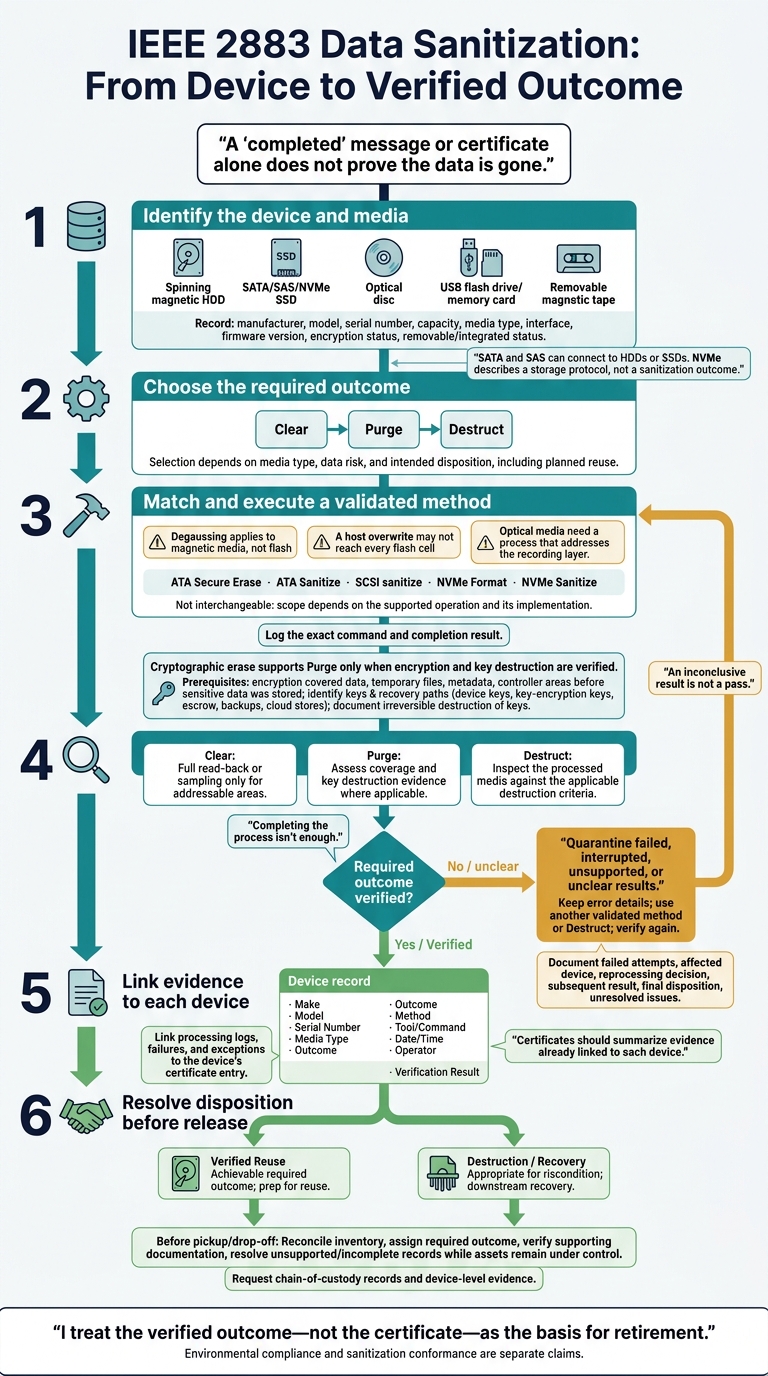
IEEE 2883 Data Sanitization: From Device to Verified Outcome
Sanitization Methods by Storage Type
Matching Methods to Media and Interfaces
Identify the storage media before choosing a sanitization method. SATA and SAS can connect to HDDs or SSDs. NVMe describes a storage protocol, not a sanitization outcome.[5][6]
Record the manufacturer, model, serial number, capacity, media type, interface, firmware version, encryption status, and whether the storage is removable or integrated. Document the selected method, required outcome, verification procedure, and intended disposition. The media type helps determine whether Clear, Purge, or Destruct applies.
Storage type | Sanitization concern | Validated outcome | Reuse impact |
|---|---|---|---|
Magnetic HDD | Addressable sectors, service areas, remapped sectors, and hidden or inaccessible areas | Clear through logical sanitization; Purge through a validated media-specific method; Destruct if coverage cannot be proven | Clear or Purge may allow reuse; degaussing can make the drive unusable |
SATA, SAS, or NVMe SSD | Spare cells, overprovisioning, remapped blocks, and controller-managed areas | Validated sanitize, block erase, or cryptographic erase may support Purge if they cover the full device; otherwise Destruct | Reuse may be possible after verified, device-wide sanitization |
Optical disc | Data retained in the recording layer | Clear or Purge only through a technique that addresses the recorded layer; Destruct when reliable erasure is unavailable | Limited; depends on disc type |
USB flash drive or memory card | Flash translation layer, hidden cells, wear leveling, and inconsistent device-level command support | Clear only within proven logical coverage; validated device-level Purge or Destruct for stronger assurance | Depends on supported methods and verification |
Removable magnetic tape | Sequential recording, servo information, and possible residual tracks | Media-appropriate Clear or Purge; Destruct when coverage is inadequate | Depends on the method and media condition |
IEEE 2883’s media-specific guidance determines whether a technique fits the device. Degaussing applies to magnetic media, not flash. Optical media need a process that addresses the recording layer.
Flash Storage and Controller Limits
A host overwrite may not reach every flash cell. Wear leveling redirects writes, overprovisioning reserves cells outside visible capacity, and remapped blocks may retain older data. NIST guidance warns that these features can make SSD overwriting unreliable.[8]
ATA Secure Erase, ATA Sanitize, SCSI sanitize, NVMe Format, and NVMe Sanitize are not interchangeable. Their scope depends on the supported operation and its implementation. Log the exact command and completion result.
Match each device’s serial number and result to its asset record. Record the interface, firmware, supported command, tool version, completion log, and verification result. Include any inaccessible or skipped storage.
Quarantine devices with failed, interrupted, unsupported, or unclear results. Keep the error details, then use another validated method or Destruct. Add the device logs to the verification record.
When Cryptographic Erase Can Meet Purge
Cryptographic erase supports Purge only when encryption and key destruction are verified. Confirm that encryption covered data, temporary files, metadata, and controller-managed areas - and that it was in place before sensitive data was stored.
Identify any remaining keys and recovery paths, including device keys, key-encryption keys, escrow records, backups, and cloud or enterprise key stores. Document irreversible destruction of the applicable keys. Where feasible, verify the cryptographic operation before taking additional sanitization steps. If verification fails, use another validated method or Destruct.[2][9]
Deleting files, formatting storage, or removing an account does not establish a Purge outcome. The verification record must show that the requirements were met.
Verifying Results and Recording Evidence
Checking Clear, Purge, and Destruct Results
After choosing a method, verify that it achieved the claimed outcome. Completing the process isn’t enough.
For Clear, use full read-back or sampling only for addressable areas. For Purge, assess coverage and key destruction evidence where applicable. For Destruct, inspect the processed media against the applicable destruction criteria.
IEEE 2883 treats sanitization as a matter of evidence: the result must match the claim.
Factor | Clear | Purge | Destruct (Destroy) |
|---|---|---|---|
Device usability | Fully reusable | Fully reusable | Completely unusable |
Recovery resistance | Protects against simple, non-invasive tools | Infeasible even with advanced recovery methods | Data cannot be recovered; highest assurance |
Verification approach | Full read-back or sampling of addressable areas supports the claim | Command completion or key destruction evidence | Visual inspection for deformation or particle size |
Recommended documentation | Read-check scope, results, and limitations | Coverage assessment and key destruction evidence where applicable | Inspection results and applicable destruction criteria |
Keep failed attempts in the record, too. Document the failure, affected device, reprocessing decision, subsequent result, and final disposition. If an issue remains unresolved, record it as such. An inconclusive result is not a pass.
This evidence forms the basis for the device record and certificate.
Linking Certificates to Device Records
Certificates should summarize evidence already linked to each device. Record the make, model, serial number, media type, outcome, method, tool or command, date and time, operator, and verification result.
Link each device’s certificate entry to its processing evidence, failures, and exceptions. A certificate alone does not prove conformance; supporting records must justify the stated outcome.
IEEE Standards Updates and Bay Area ITAD
Checking IEEE Publications After IEEE 2883-2022
Track IEEE publication updates, but base retirement decisions on the current device record and verified outcome.
Reuse and Failed Sanitization
Use each asset’s device record and verified sanitization outcome to decide whether to reuse, repair, or destroy it. Classify retired assets by storage type, condition, data sensitivity, and intended disposition.
Reuse can preserve equipment value if the required sanitization outcome is achievable. If it isn’t, destruction may be needed. Confirm how destroyed media will be handled during downstream recovery.
Rica Recycling Services and Retirement Records
Vendor records should match the device-level outcome documented during sanitization.
Rica Recycling offers secure data destruction, certificates, and IT asset recovery in the Bay Area. Before scheduling pickup or drop-off, request chain-of-custody records and device-level evidence.
Environmental compliance and sanitization conformance are separate claims. A certificate alone does not prove IEEE 2883 conformance.
SNIA CMSS23 - Storage Sanitization the Next Chapter
Conclusion: Match Methods to Verified Outcomes
Choose Clear, Purge, or Destruct based on media type, data risk, and whether the device will be reused. Cryptographic erase meets Purge only when encryption covers the data and key destruction is verified [11].
Keep device IDs, process logs, and verification results together in one complete record before any pickup or drop-off. Quarantine failed media until it is reprocessed or destroyed [10]. Check the current IEEE publication status before changing procedures [7].
For Bay Area retirements, the final check is whether the documentation proves the required outcome. Before pickup with Rica Recycling, reconcile the inventory, assign each device its required outcome, and verify the supporting documentation. Resolve unsupported devices and incomplete records before pickup, while the assets are still under your control.
FAQs
How do I choose between Clear and Purge?
Choose Clear or Purge based on how sensitive the data is, the storage media, and whether the devices stay under your control.
Clear uses techniques such as overwriting to prevent basic recovery. It suits non-sensitive data on devices that stay within your organization.
Purge makes even advanced forensic recovery infeasible. Use it for sensitive or regulated data, especially before selling or donating a device. SSDs and NVMe drives require Purge because standard overwriting is unreliable on flash storage.
Do IEEE 2883 updates require changes to my ITAD policy?
Yes. Updates to IEEE 2883-2022 mean you should review your ITAD policy and revise it if needed. NIST SP 800-88 Rev. 2 no longer includes device-specific instructions, so organizations are encouraged to consult IEEE 2883-2022 for detailed sanitization techniques.
Your policy should match sanitization methods to media types. Overwriting alone is often insufficient for flash storage. IEEE 2883-2022 helps you select appropriate hardware-level Purge methods, such as cryptographic erasure, to maintain compliance and protect data.
How long should I retain sanitization records?
Retention periods depend on your industry and regulatory obligations. NIST 800-88 Rev. 2 guidelines call for keeping sanitization logs for at least 36 months [1], but some requirements extend beyond that: