
Most retired IT gear loses money the longer it sits. If I want the best return, I need to do four things in order: inventory assets, secure data, choose the right disposition path, and recycle what’s left under California rules.
Here’s the short version:
Start before decommissioning begins so gear does not miss its best resale window.
Track every asset by serial number and note condition, specs, storage media, and location.
Separate data-bearing devices from non-data gear right away because that changes handling, records, and resale options.
Sanitize or destroy data first using a documented process based on NIST SP 800-88 Rev. 2.
Use the highest-return path first: redeploy, resell, harvest parts, then recycle.
Move fast. Hardware processed within 30 to 60 days usually holds more resale value than gear left idle for 6 to 12 months.
Keep proof: chain-of-custody logs, destruction records, and recycling reports.
Recycle end-of-life equipment through a certified provider when reuse or resale no longer makes sense.
A few numbers stand out. The article notes that storage media can account for 30% to 60% of residual device value in some cases, and one campus refresh recovered about $74,000 through redeployment plus certified drive destruction. That tells me the process is not just about disposal. It is about getting money back while cutting data and legal risk.
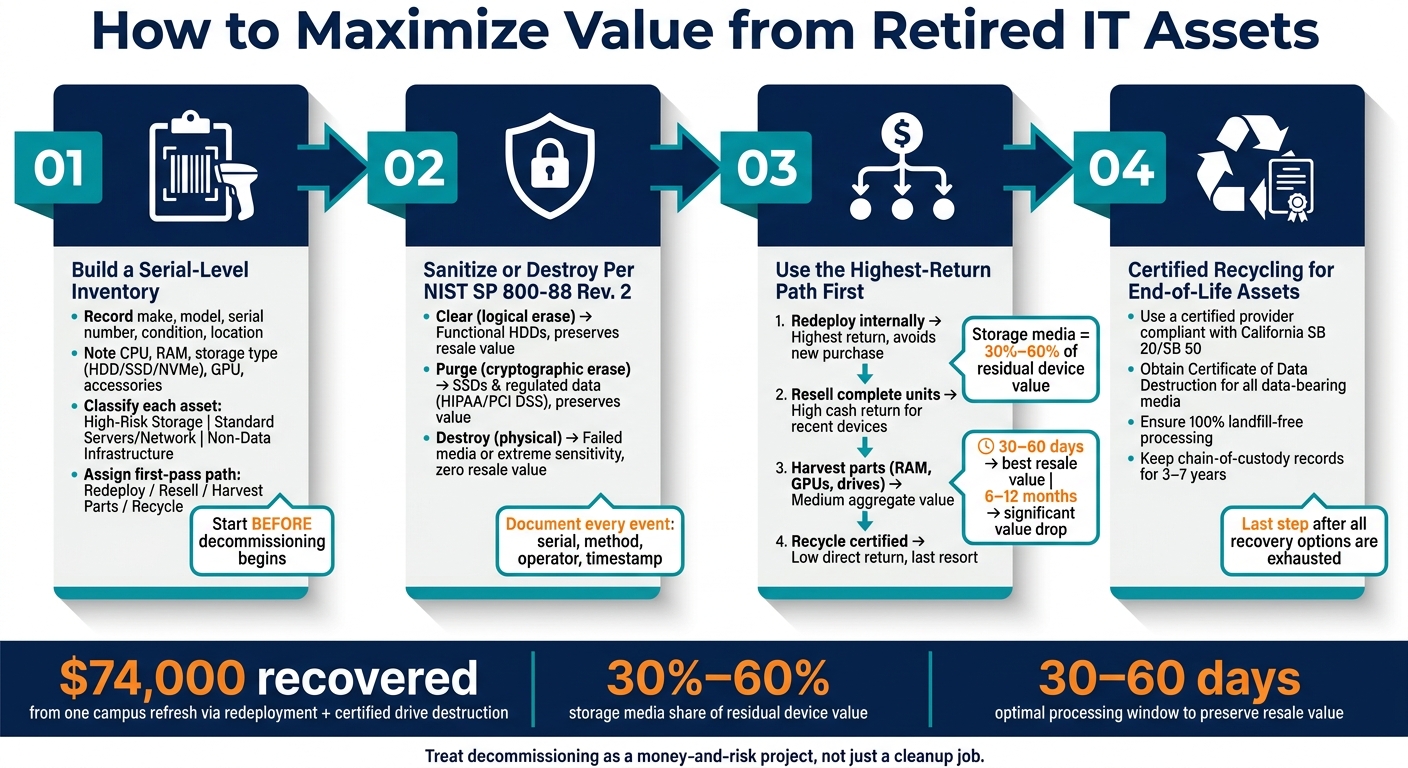
IT Asset Retirement: 4-Step Process to Maximize Value & Minimize Risk
Quick comparison
Path | Best use | Return | Main tradeoff |
|---|---|---|---|
Redeploy | Gear still useful in-house | Highest overall | Needs testing, tracking, and internal planning |
Resell | Newer working devices with market demand | High | Needs data sanitization and faster turnaround |
Harvest parts | Older gear with weak full-unit demand | Medium | More labor and per-part handling |
Recycle | Broken, obsolete, or no-demand items | Low direct return | Last step after all other options |
If I sum it up in one line: the way to get more from retired IT assets is to treat decommissioning like a money-and-risk project, not just a cleanup job.
Build an asset inventory and sort equipment by value
A serialized inventory is the starting point for any IT asset recovery project. If you skip it, things go sideways fast. Assets get lost, labeled the wrong way, or sent to recycling even though they still have resale value. Finish the inventory before anything leaves the site.
Record the details buyers and recyclers need
Once the scope is locked in, build a serial-level inventory. Each asset record should include the basics: make, model, serial number, device type, physical condition, and current location. For rack-mounted equipment, add the rack ID and rack unit position.
After that, the details that tend to affect pricing most are CPU type and generation, RAM capacity, storage type and size (HDD vs. SSD vs. NVMe), GPU presence, power status, and any included accessories like power adapters, rails, or network modules.
It also helps to include purchase date, original cost, depreciation, and current book value. That gives you a simple way to compare recovery offers against book value.
For large fleets, start with an export from the CMDB or endpoint tool. Then verify condition, accessories, and power status on site. If a device has a damaged or missing label, photograph the serial label before removal and record backup identifiers such as MAC addresses or BIOS data.
Classify data risk and resale potential
Once the hardware details are in place, add a data risk classification to each record. Start with one basic question: does the asset store data? That splits assets into three tiers: high-risk storage, standard servers and network gear, and non-data-bearing infrastructure.
Asset Category | Key Inventory Fields | Data Risk Level |
|---|---|---|
High-security storage (SSDs, HDDs, storage arrays, backup appliances) | Drive serial number, capacity, interface, encryption capability, data classification, required sanitization method | High |
Standard servers & network gear | Make, model, serial number, CPU type and generation, RAM, storage type and capacity, power status, port count, rack location | Medium |
Non-data-bearing infrastructure (racks, cabling, PDUs, patch panels) | Asset type, material, rack units, condition, quantity | Low/None |
Some gear is a clear fit for resale or redeployment. If it’s fairly new, has current specs, and is in good condition, it still has market value. Older hardware with dated CPUs, low RAM, or spinning-disk storage often fits better in a parts-harvesting path. End-of-life equipment with failing hardware should go straight to certified recycling services.
Give each asset a first-pass path:
redeploy
resell
harvest parts
recycle
That inventory becomes the working document for data sanitization and chain-of-custody decisions in the next step.
Handle data security first, then choose a recovery path
Once you've finished the inventory, deal with data before anything leaves your control. That step protects sensitive information and keeps the asset open for reuse, resale, or parts harvesting.
Use the risk tier you already assigned during inventory to pick the right sanitization method.
Use documented data sanitization and chain of custody
NIST SP 800-88 Rev. 2 is the current U.S. benchmark for media sanitization. It breaks sanitization into three methods:
Clear: Logical erasure that leaves the device usable.
Purge: Cryptographic or secure erase that blocks forensic recovery. Use this for SSDs, self-encrypting drives, and anything with regulated data under HIPAA or PCI DSS.
Destroy: Physical destruction for failed media or cases with strict security rules.
For HDDs, software wiping works well when the drive still functions and the risk level is moderate. For SSDs, don't rely on overwriting. Wear leveling means some cells may never get touched. Use cryptographic erase or a vendor-specific secure erase tool instead. For failed media, physical destruction makes sense because you can't sanitize the data with enough confidence.
Sanitization Method | Media Fit | Resale Impact | Best For |
|---|---|---|---|
Software wiping (Clear) | Functional HDDs | Preserves value | Large volumes of reusable gear |
Cryptographic erase (Purge) | SSDs, self-encrypting drives | Preserves value | High-sensitivity but marketable drives |
Degaussing (Destroy) | Magnetic HDDs, tapes | Destroys value | High-security magnetic media |
Physical destruction (Destroy) | All types | Zero value | Failed media or extreme data sensitivity |
Document every sanitization event. Record the serial number, method used, tool name and version, operator identity, timestamp, and result. Then track each handoff: who had the asset, when they had it, where it was stored, and how it moved. For high-risk assets, use tamper-evident packaging. Issue one certificate per asset, and keep records for 3–7 years based on your compliance rules.
After the data step is done, route each asset into the recovery path that gives you the most return.
Prioritize redeployment, resale, or parts harvesting
Sanitized assets can now move into the option that gets the most value back. The usual order is internal reuse first, then resale, then parts harvesting, and finally recycling.
Internal reuse is often the best deal because it avoids a new purchase. Resale works when buyers still want the full unit. Speed matters. Processing and listing assets within 30–60 days of decommissioning tends to bring better returns. Wait 6–12 months, and value can drop hard as newer hardware hits the market and depreciation keeps eating away at price [2].
If demand for the full device is weak, move to parts harvesting. After sanitization, pull the components that still have market value. RAM, drives, GPUs, and power supplies often sell on their own even when the full system does not. Storage media alone can make up 30% to 60% of a device's residual value [1].
Compare disposition options by total return
Total return is bigger than the resale payment. It also includes avoided capital spend from reuse, labor for sanitization and logistics, compliance risk, and sustainability impact.
Disposition Path | Recovery Value | Labor Required | Compliance Risk | Sustainability Impact |
|---|---|---|---|---|
Internal reuse / redeployment | Highest (avoids new purchase cost) | Moderate | Low (stays in-house) | Excellent |
Complete unit resale | High cash return for recent devices | Moderate to high | Moderate (requires documented sanitization) | Strong (extends device life) |
Parts harvesting | Medium aggregate value | High (disassembly + individual testing) | Higher (each data-bearing component needs sanitization) | Good |
Recycling | Low direct return | Low to moderate | Low (if drives removed or destroyed) | Positive when certified landfill-free |
Match the path to the asset's condition and market value. A working 3-year-old server with current-gen processors and intact rails fits resale. A 6-year-old unit with a failed drive and missing parts is usually better off in recycling, after any remaining storage is destroyed.
Assets with no reuse or resale value should go to certified electronic recycling.
Recycle end-of-life equipment responsibly with Rica Recycling
When an asset has no resale or parts value left, it’s time to move from recovery to compliant recycling. Rica Recycling offers certified electronics recycling, secure data destruction, and chain-of-custody documentation for Bay Area organizations. That helps support compliance with California e-waste rules, including SB 20/SB 50.
When to send assets to Rica Recycling
Some assets shouldn’t sit in the recovery pipeline any longer than needed. Move them out fast when you see signs like these:
Age and obsolescence: If equipment is outdated or there’s no resale demand left, material recovery usually makes more sense.
Failed or incomplete units: Assets that fail testing or are missing critical parts are weak resale candidates.
Drives or media requiring destruction: If media must be physically destroyed or can’t be sanitized with confidence, resale is off the table.
Hazardous materials: Items with lead-acid batteries, mercury switches, or refrigerants need certified handling.
Rica Recycling handles these cases for businesses, schools, and organizations across the San Francisco Bay Area. If you’re handing off any data-bearing media, ask for a Certificate of Data Destruction. That paper trail matters.
Prepare equipment for pickup or drop-off
A little prep goes a long way. It keeps your chain of custody clear and helps Rica Recycling process the load faster.
Label pallets, keep a serialized load list, and make sure it matches the pickup record. Sort equipment by material type before handoff. Also, unenroll all devices from remote management tools and disconnect them from cloud accounts before pickup.
Remove batteries from laptops and other portable devices to lower fire risk during transport. If you’re dealing with a large decommissioning project - like a full data center teardown or an office refresh - it’s smart to schedule a planning call or walkthrough with Rica Recycling ahead of time. That gives both sides time to line up logistics, rack breakdown, and pickup timing.
Rica Recycling offers pickup and drop-off options. Pickup pricing varies based on volume, labor, and location.
Match each asset category to the right processing path
For assets that come in for recycling, the next step depends on one simple thing: can the item still be refurbished, or does it need to go straight to material recovery?
Asset Category | Data Handling | Refurbishment Potential | Recycling Outcome |
|---|---|---|---|
Working Servers | NIST 800-88 Sanitization | High - resale or buyback | Parts harvesting if unsold |
Nonworking Computers | Physical destruction | Low | Material recovery (metals/plastics) |
Mixed Electronics | Sorting/Assessment | Variable | 100% landfill-free processing |
Rica Recycling’s landfill-free policy means every item goes through a responsible processing path. No material goes to landfill.
Conclusion: A straightforward process to recover more value and reduce risk
Once you have inventory, sanitization, and disposition in place, this becomes a repeatable process. It works best when you follow the steps in order. Skip a step, and you can end up losing money while adding compliance risk.
One campus refresh recovered about $74,000 through redeployment and certified drive destruction.[3] That result depended on a documented chain of custody.
For Bay Area organizations, certified recycling is the last step when reuse, resale, and parts harvesting no longer make sense. At that point, Rica Recycling offers certified handling, secure data destruction, and landfill-free processing.
Used on a consistent basis, this process helps recover more value, protect sensitive data, and cut waste.
FAQs
How do I know whether to resell or recycle retired IT equipment?
It depends on the asset’s condition, age, market demand, and one simple thing: does it still work?
Start with a basic audit of each device. Check the model, age, and physical condition.
Resell equipment that still works well and has been kept in good shape, especially if it’s less than four years old.
Recycle equipment that’s damaged, too old, hard to sell, or can’t be securely wiped because of hardware failure.
What records should I keep during IT asset disposition?
Keep a detailed, serialized inventory for all decommissioned hardware. Include the manufacturer, model, serial number, asset tag, age, configuration, maintenance history, and current condition.
You should also keep chain-of-custody logs, serialized Certificates of Destruction for data-bearing devices sanitized to NIST 800-88, and final disposition reports that show whether each asset was resold, recycled, or destroyed.
Which devices need data destruction before leaving my site?
Any device that stores sensitive information needs data destruction before it leaves your site. That includes hard drives, servers, laptops, mobile phones, printers, IP phones, routers, switches, tablets, and UPS systems.
And yes, this applies even if the device no longer works. A dead laptop or broken printer can still hold confidential or business data. That’s why all data-bearing assets should be sanitized or physically destroyed in line with NIST SP 800-88 before repurposing, resale, or recycling.