
Best Practices for Audit Trails in Data Wiping
Audit trails are critical in data wiping because they document every step of the process, ensuring compliance with regulations like HIPAA, GDPR, and CCPA. Without proper records, organizations risk data breaches, compliance failures, and costly fines. Here's what you need to know:
- Common Gaps: Missing serial numbers, vague logs (e.g., "data wiped"), incomplete timestamps, and undocumented failures are common issues that lead to audit rejections.
- Key Elements: A complete audit trail should include device identity (e.g., serial numbers), personnel validation (e.g., operator certifications), process documentation (e.g., sanitization method), and technical verification (e.g., pass/fail status).
- Tamper Prevention: Use immutable storage, cryptographic hash chaining, and digital signatures to protect logs from alterations.
- Retention: Keep records for the required duration (e.g., 6 years for HIPAA) and ensure accessibility for audits.
- Centralization: Store all logs in one system, with standardized formats and clear naming conventions for easy retrieval.
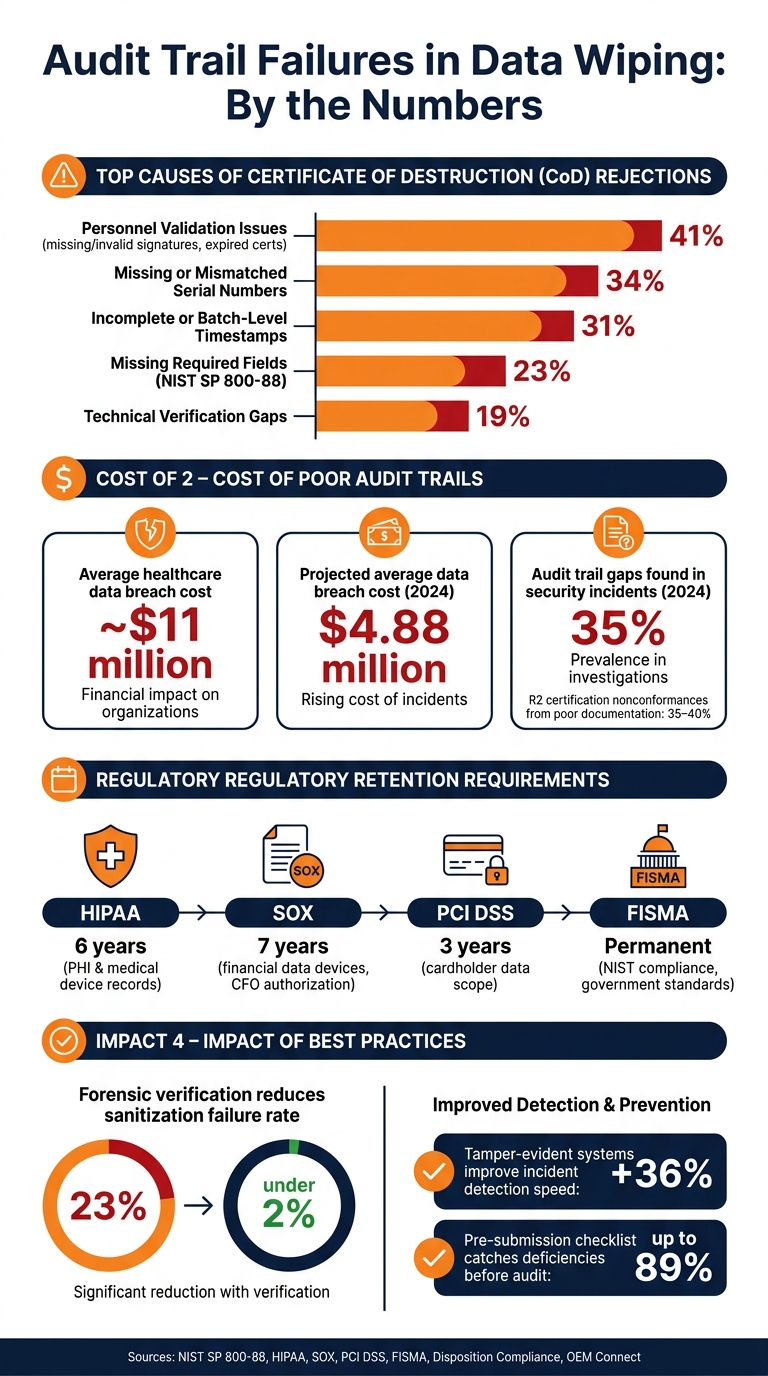
Top Audit Trail Failures in Data Wiping: Key Stats & Compliance Requirements
How to Verify Secure Data Destruction | Certificates, Audit Trails & Proof of Sanitization
sbb-itb-855056e
Common Audit Trail Gaps in Data Wiping
Understanding the common gaps in audit trails is essential for creating a reliable and compliant data-wiping process. Even organizations with well-established data security policies can fall short when it comes to audit trails. The problem often lies in subtle oversights that only become apparent during audits.
Where Wipe Event Logging Falls Short
Wipe event logging often fails in four key areas: device identification, process documentation, personnel validation, and technical verification. For instance, issues like missing independent witness signatures or outdated certifications account for 41% of rejections. Similarly, mismatched or absent serial numbers contribute to 34% of rejections.
Using vague terms such as "data wiped" or "secure delete" isn't enough. Logs must include specific technical standards, like "NIST SP 800-88 Rev 1 Clear", to satisfy auditor expectations. Another common issue is the use of generic, batch-level timestamps that fail to document start and finish times for individual devices. This oversight is responsible for 31% of Certificate of Destruction (CoD) rejections.
"If you can't produce a record showing what happened to a specific drive, the wipe didn't happen as far as an auditor is concerned." - Justin, OEM Connect
One often-overlooked gap is the lack of a documented escalation process. For example, when a device cannot be wiped due to a locked or damaged drive, the failure and subsequent transfer to physical destruction services must be recorded. Many organizations fail to document these escalations, leaving a glaring hole in their audit trail that auditors are quick to identify.
These deficiencies not only weaken the integrity of the process but also leave organizations vulnerable to compliance risks.
Compliance Risks of Incomplete Audit Trails
Incomplete or disorganized logs create more than just administrative challenges - they pose serious compliance risks. Regulations such as HIPAA, CCPA, and PCI DSS demand clear, traceable evidence for every device. A critical element is the chain-of-custody. Gaps like informal handoffs, undocumented transfers, or records scattered across disconnected systems create "blind spots" that break this chain.
Additionally, when records are stored in outdated systems and become inaccessible years later, they lose their value entirely. This is especially risky in industries like healthcare, where the stakes are high - a single data breach can cost nearly $11 million. These risks make it clear that poorly maintained audit trails are a liability organizations cannot afford.
What a Complete Wipe Audit Trail Should Include
To close audit gaps effectively, organizations need to follow clear and defensible guidelines. Many assume their wipe logs are sufficient - until an auditor requests a specific drive's record, and the trail comes up empty. According to NIST SP 800-88 Section 4.8, a proper audit trail should include 12 specific data fields divided into four categories. Missing even one of these fields can lead to significant issues - 23% of Certificates of Destruction (CoDs) are rejected simply because they lack required information.
Required Fields for a Complete Audit Log
The four categories - device identity, process documentation, personnel validation, and technical verification - are essential for a successful audit. Each category has specific fields that must be documented to avoid failure.
| Category | Required Fields | Audit Failure Rate if Missing |
|---|---|---|
| Device Identity | Serial number, asset tag, model number | 34% |
| Personnel Validation | Operator name, witness signature, certification ID | 41% |
| Process Documentation | Sanitization method, start/end timestamps (with timezone), location | 28% |
| Technical Verification | Completion status (pass/fail), method validation, equipment/software ID | 19% |
Independent witness validation is especially critical. Any lapse, such as an expired certification, can invalidate recent records.
"If an operator's certification expires, all CoDs they signed during the 30 days before expiration become invalid for audit purposes regardless of when the work was performed." - Disposition Compliance
Capturing all required fields is only one piece of the puzzle. Accuracy and immutability are just as important to ensure a defensible audit trail.
Keeping Audit Trail Data Accurate and Unaltered
It’s not enough to collect the required data fields - they need to be accurate and protected from tampering. Accuracy starts with intake. For instance, device serial numbers should be recorded within 15 minutes of receipt, ideally using barcode scanning or photography, to minimize transcription errors. Each log must also include detailed timestamps at the device level, with time zone information, rather than relying on generic batch timestamps.
To maintain the integrity of records, it’s crucial to prevent any alterations. Digital signatures and cryptographic hashes are essential tools for ensuring that logs remain unmodified after the wipe event is recorded.
"Digital signatures and tamper-evident storage are standard practice. Your documentation system needs cryptographic proof that records weren't modified after creation." - Disposition Compliance
Technical verification is another key element. Relying solely on software-generated success reports isn’t enough. Independent verification using forensic tools like R-Studio or PhotoRec on a random 10% sample of sanitized drives can confirm process integrity. Documented evidence, such as forensic reports showing zero recoverable data, can significantly lower failed sanitization rates - from 23% to under 2% in enterprise environments.
How to Make Audit Logs Tamper-Evident
Gathering the right data is just the starting point. To ensure a reliable audit process, logs must be tamper-evident. Once a wipe event is recorded, the log must be safeguarded against any modification - whether accidental, malicious, or due to internal misuse. A 2024 analysis found gaps in audit trails in 35% of security incidents, highlighting how editable logs can undermine accountability. After capturing the necessary data, these strategies can help preserve log integrity.
"A log that can be deleted is not a log - it is a liability that creates false confidence in accountability." - NIST SP 800-53 AU-9 Guide
Using Immutable Storage for Audit Logs
To protect wipe logs, start with immutable, append-only storage. This ensures entries can be added but never altered or deleted. Options like AWS S3 Object Lock or Azure Immutable Blob Storage enable this functionality in cloud environments without requiring specialized hardware.
Separating system privileges is equally important. The account running the data wiping software should not have ownership of the log storage destination. This separation minimizes risks from single-account breaches. For sensitive operations, implement dual authorization - requiring two independent approvals before altering log configurations or retention policies.
For additional security, use cryptographic hash chaining. By linking each log entry's hash to the one before it, any tampering becomes immediately apparent, as it breaks the chain. Organizations with advanced tamper-evident systems have reported a 36% improvement in incident detection speed compared to those using standard logs.
While immutable storage blocks unauthorized changes, accurate timestamps are equally critical for proper event tracking.
Keeping Timestamps Consistent Across Systems
One common issue in audit trails is inconsistent timestamps. If devices operate on unsynchronized clocks, correlating events across systems becomes unreliable - or impossible. To avoid this, synchronize all systems to a central Network Time Protocol (NTP) server, which prevents clock drift and ensures consistent time references.
Standardizing timestamps in the ISO 24-hour format with timezone indicators (e.g., 2026-06-07T14:32:00-07:00) is crucial, especially for operations spanning multiple sites or time zones. Without this, ambiguous timestamps like "2:30 PM" can lead to confusion during audits or compliance reviews.
Securing Logs with Encryption and Access Controls
Once logs are stored securely and timestamps are synchronized, encryption and access controls add another layer of protection. Applying digital signatures to logs at the moment of creation ensures their authenticity. Auditors can verify that logs haven’t been altered since their creation, providing clear tamper evidence for every recorded wipe event.
Access to logs should also be tightly controlled. Use role-based access control (RBAC) to restrict who can view or modify logs. Assign specific roles to ensure no individual can both delete data and manipulate logs. Additionally, track all access to secure zones - whether through badge systems or manual sign-ins - to further strengthen audit integrity and deter tampering.
| Control Method | Purpose | Implementation Strategy |
|---|---|---|
| Digital Signatures | Ensure tamper-evidence | Sign logs immediately upon creation |
| Append-Only Storage | Prevent record alteration | Use WORM or cloud object lock solutions |
| Time Sync (NTP) | Enable accurate correlation | Synchronize all clocks to a central NTP server |
| RBAC & Access Logs | Strengthen accountability | Restrict access; log all entries to secure zones |
| Hash Chaining | Detect retroactive changes | Chain each entry's hash to the previous one |
Centralizing and Standardizing Wipe Logs
Even with tamper-evident storage and synchronized timestamps, having logs scattered across multiple sources can create major blind spots. By centralizing these records, you ensure that no piece of information is isolated. This approach not only strengthens data integrity but also simplifies the auditing process.
"Proof that existed once and can't be found is the same as proof that never existed." - Justin, OEM Connect
Centralization allows stakeholders to piece together a device's entire lifecycle - from custody to data sanitization to final disposition - into one cohesive, traceable record.
Collecting Wipe Logs in One Place
A centralized system should combine all logs, including those from wiping software, intake forms, physical destruction records, and inventory tracking. This ensures you can retrieve any record in minutes during an audit.
For seamless sharing with external auditors, the system must support exporting logs in CSV or PDF formats. To make the system navigable, maintain a master index document that tracks each log type by ID, version number, owner, and last review date. This transforms a chaotic pile of records into an organized, controlled archive.
Regular reconciliations - daily or weekly - between intake, work-in-progress (WIP), and shipment logs are essential to catch and resolve discrepancies quickly.
Once centralized, standardizing the log formats and definitions becomes the next critical step.
Standardizing Log Fields and Naming Conventions
Centralization is only effective if the incoming data is consistent. For example, 23% of Certificates of Destruction are rejected by auditors because they lack mandatory fields required by NIST SP 800-88. Generic entries like "data wiped" or "secure erase" aren't sufficient - logs must specify precise methods, such as "NIST SP 800-88 Rev 1 Clear" or "DOD 5220.22-M 3-pass overwrite".
To avoid these issues, every log entry should include standardized fields across four key categories:
| Log Category | Essential Standardized Fields | Objective |
|---|---|---|
| Receiving/CoC | Intake date, customer, seal number, pallet/unit count, unique intake ID | Establishes the start of the chain of custody |
| Data Sanitization | Device serial, media type, method, tool version, verification result | Provides technical proof of data destruction |
| Inventory/WIP | Asset tag, current location, process stage, responsible technician, status | Tracks asset movement and current state |
| Final Disposition | Outbound ID, destination, resale/recycle status, certificate reference | Documents the asset's end-of-life outcome |
For naming conventions, adopt a consistent format like PROC-ITAD-INTAKE-001_v3.1_2026-06-07. This makes files version-controlled, searchable, and easy to track. In digital systems, use standardized dropdown menus for fields like disposition status (e.g., pass/fail/hold/scrap) or exception codes to eliminate discrepancies. Free-text fields, while tempting, often lead to inconsistent entries; dropdowns enforce uniformity.
"If a third party can understand your records without asking you questions, you've done it right." - DecideAgree Editorial Team
Ultimately, a well-centralized and standardized system ensures your records are clear, self-explanatory, and audit-ready.
Review, Retention, and Reporting for Audit Trails
Regularly reviewing and properly retaining logs are just as critical as ensuring audit trails are complete and tamper-evident. These practices ensure compliance and provide a reliable foundation for audits.
Setting a Risk-Based Review Schedule
The frequency and depth of log reviews should align with the risk level of the data involved. For example, under FIPS 199 impact levels, highly sensitive data - like regulated health information or classified records - requires 100% validation instead of periodic sampling. For less sensitive data:
- Low-risk batches: A 10% sample review is generally sufficient.
- Medium-risk batches: A 20% sample is recommended.
- High-risk batches: A 30% sample is appropriate.
Given the 15–30% sanitization failure rates reported for SSDs and NVMe drives, automated alerts for logs marked as "failed" or "incomplete" are essential. Waiting for a quarterly audit could leave issues unresolved for too long.
Another critical point: ensure that operator certification statuses are checked during reviews. Expired certifications can invalidate Certificates of Destruction (CoDs), undermining the entire process.
How Long to Retain Wipe Logs
Retention policies should align with the strictest applicable regulation to your organization. This ensures compliance across all relevant standards.
"Retention periods vary by industry and policy. Many organizations align destruction record retention with broader records management requirements so that certificates, logs, and related documentation are kept for a consistent period." - Richie Steffens, CEO, TechWaste Recycling
Here’s a quick comparison of retention requirements across common regulations:
| Regulation | Retention Period | Key Requirement |
|---|---|---|
| HIPAA | 6 years | Covers PHI classification and medical device protocols |
| SOX | 7 years | CFO-level authorization for financial data devices |
| PCI DSS | 3 years | Includes cardholder data scope and PAN truncation validation |
| FISMA | Permanent | Enforces NIST compliance and government security standards |
Additionally, any gap in documented device custody longer than 30 minutes typically requires a written explanation to pass a thorough audit. Retention isn’t just about keeping records; it’s about ensuring those records remain complete and accessible.
Building Reports That Serve as Audit Evidence
A Certificate of Destruction alone doesn’t qualify as a complete audit record. A robust report must link every step of the process - pickup, intake, sanitization, and final disposition - back to the specific device.
"From an auditor's perspective, the lack of documentation is typically treated the same as a lack of erasure, meaning your organization may be held accountable regardless of whether the data was actually removed." - Jetico Technical Support
To stand up to scrutiny, audit-ready reports should include:
- Serial-number-to-method traceability
- Dual signatures: one from the operator and one from an independent witness (not a subordinate)
- Timestamps with timezone information
Personnel validation issues, such as missing or invalid signatures, account for 41% of audit failures, while missing serial numbers cause another 34%. A simple 5-point pre-submission checklist can catch up to 89% of deficiencies before they even reach an auditor.
Don’t forget exception reports. Devices that failed a wipe, were locked, had missing media, or required physical destruction need their own detailed documentation. These records demonstrate your ability to handle anomalies, not just routine cases, providing auditors with confidence in your overall process.
Conclusion: Building a Reliable Data Wiping Audit Process
An effective audit trail is what separates confidently proving data destruction from merely hoping it happened. The strategies outlined - such as using tamper-evident log storage, synchronized timestamps, centralized records, and retention based on risk - provide a solid foundation for tracking every step of a device’s lifecycle.
As Jared Clark, Principal Consultant at Certify Consulting, puts it:
"If it isn't written down, it didn't happen - that is the operative logic of every accredited certification audit." - Jared Clark
The key to passing audits boils down to two main practices: First, track each asset individually to ensure accountability. Second, test your ability to trace a device’s journey - from pickup to its final disposition - within 10 minutes. Meeting this benchmark demonstrates that your audit trail can withstand close inspection.
Considering the average cost of a data breach is projected to hit $4.88 million in 2024, and 35% to 40% of nonconformances in initial R2 certification audits stem from poor documentation, the importance of a well-maintained audit trail becomes undeniable. The good news? Most failures can be avoided by sticking to consistent, well-designed processes rather than relying on costly tech solutions.
For businesses managing end-of-life electronics in the San Francisco Bay Area, Rica Recycling offers certified, secure data destruction services. Their compliance documentation ensures your audit process aligns seamlessly with your security protocols.
FAQs
What’s the minimum info each wipe log must include?
To align with NIST 800-88 standards and ensure a solid audit trail, every wipe log should cover these key elements:
- Device details: Include the serial number, asset tag, and model number of the device.
- Process details: Record the sanitization method used, along with start and end timestamps, including the timezone.
- Accountability: Document the names of both the operator and the verifier responsible for the process.
- Verification results: Note the completion status as well as the software name and version utilized.
How can we prove wipe logs weren’t altered later?
To keep wipe logs reliable, it's crucial to use digitally signed or tamper-proof logs that allow secure verification. Assign each wipe certificate to an individual device's serial number instead of grouping them by batch totals. Store these records in a centralized, searchable system to simplify retrieval during audits. Also, maintain thorough documentation of the chain of custody - tracking every step from asset removal to final sanitization - to ensure secure handling at every stage.
What should we do when a device wipe fails?
If a device wipe doesn't work, shift to physical destruction as the next step. Drives that can't be sanitized through overwriting need to be permanently destroyed using methods like shredding, incineration, or disintegration. Make sure to document everything in your audit trail - record the failed wipe and the physical destruction that followed. This ensures a clear chain of custody and helps maintain compliance standards.