
Checklist for IT Asset Management in Schools
Managing IT assets in schools requires a clear plan to track devices, control costs, and meet compliance standards. From setting policies to securely retiring outdated devices, schools must ensure every step is efficient and secure. Key points include:
- Governance: Establish clear policies, assign roles, and align tasks with the academic calendar to reduce losses (e.g., 60%-70% of device losses happen during summer collection).
- Inventory Tracking: Start with a verified audit, tag devices, and centralize records in an ITAM system. Schools using ITAM software report lower device loss rates (2%-3% vs. 5%-8% with manual tracking).
- Procurement and Deployment: Focus on total cost of ownership, OS support longevity, and compliance with funding rules. Automate deployment with MDM systems for consistency.
- Maintenance and Repairs: Schedule regular updates, track warranties, and log repairs to extend device life. Patterns in repair data can guide smarter purchasing decisions.
- Data Security: Follow FERPA and NIST SP 800-88 guidelines for secure data wiping. Use encryption, remote wipe features, and certified methods for device sanitization.
- Disposal and Recycling: Plan refresh cycles based on device age and funding deadlines. Securely wipe or destroy data before recycling, and choose certified e-waste recyclers.
With over 88% of districts struggling to refresh devices after COVID-era funding, efficient IT asset management is more critical than ever. Schools can reduce losses, ensure compliance, and optimize resources by following these steps.
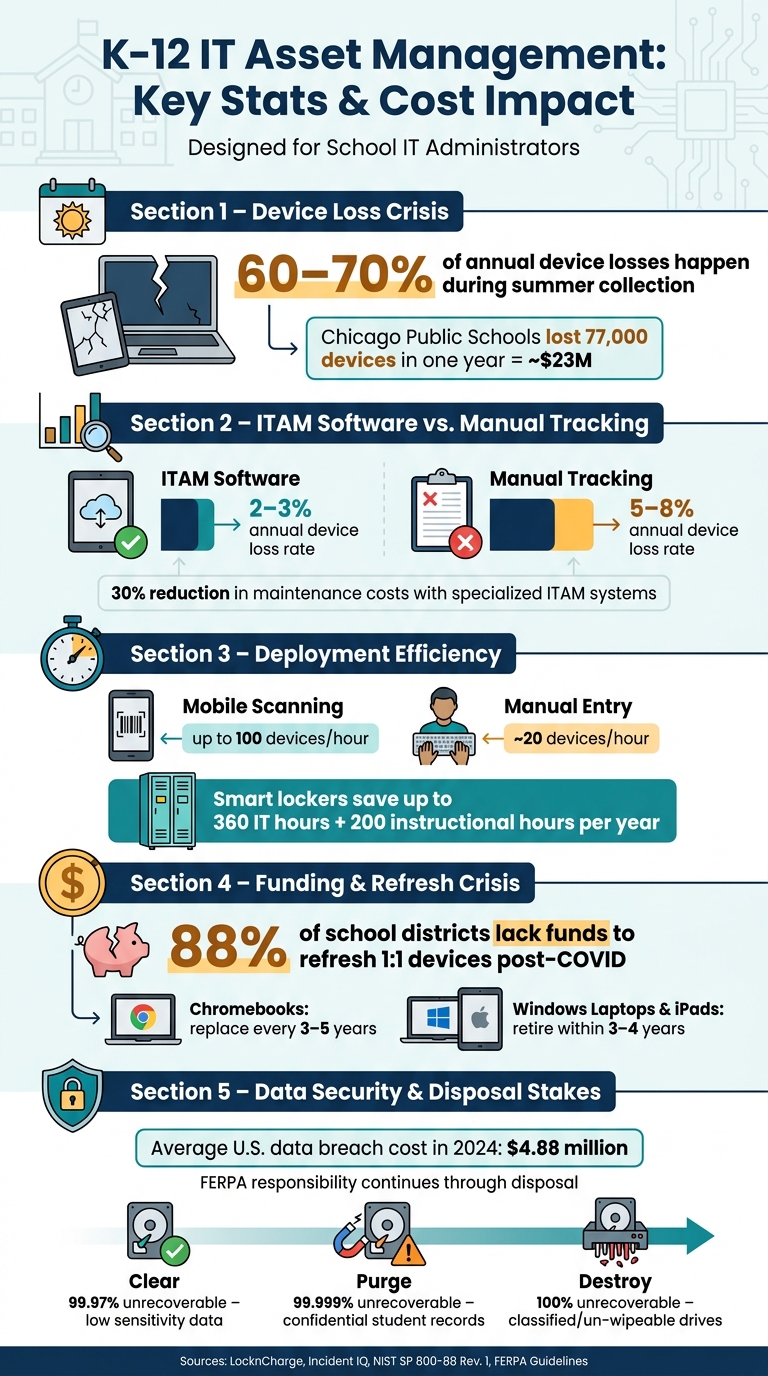
K-12 IT Asset Management: Key Stats & Cost Impact
Governance and Planning for IT Asset Management
Setting Policies and Assigning Roles
The foundation of effective IT Asset Management (ITAM) lies in establishing clear, written policies. These should cover everything from device assignment and usage guidelines to damage protocols, software subscriptions, and disposal procedures. Without these formal policies, decision-making can become inconsistent, leading to accountability issues.
"The ITAM governance framework is a structure of policies, processes, and roles that guide and control IT asset management activities in your organization." - Incident IQ Team
Equally important is assigning specific roles to ensure smooth operations. The RACI model is a helpful framework for this. Here's how it works:
- Policy Owner: Typically the IT Director or CISO, accountable for ensuring policies are followed.
- Process Owner: Often the IT Asset Manager or IT Operations lead, responsible for daily implementation.
- Executors: This group includes IT technicians, library media specialists, and facilities staff who handle tasks like device check-ins and compliance documentation.
For example, librarians can oversee high-volume device loans and returns, while the finance office manages compliance paperwork for programs like E-rate and Title I. Securing early support from district leadership is critical. Without executive sponsorship, ITAM programs can falter, especially when budgets are tight.
Once roles and policies are in place, the next step is to synchronize ITAM activities with the school calendar.
Aligning ITAM Tasks with the School Calendar
Timing is everything when it comes to ITAM in schools. A striking statistic: 60% to 70% of annual device losses occur during summer collection rather than the school year. This makes the end-of-year collection period a high-risk time that requires careful planning.
| Academic Period | Key ITAM Activities |
|---|---|
| April–May | Plan collection strategy; send automated reminders to families; identify refresh needs |
| June–July | Year-end collection; inventory audit; bulk recycling/ITAD; data wiping |
| August–September | Start-of-year deployment; device assignment to new students; inventory reconciliation |
| January | Mid-year audit; loaner pool status check; winter break maintenance and updates |
| Spring Break | Batch repairs; warranty claim submissions; preventive maintenance |
Start planning for year-end collection as early as April. Use multiple communication channels like LMS announcements, emails, and reminders during homeroom to notify families about returning items such as devices, chargers, cases, and styluses. To avoid bottlenecks, consider staggering return dates by grade level. The summer break is an excellent time for tasks like re-imaging devices, applying security updates, and recycling retired assets.
Planning for Data Security and Privacy
In addition to scheduling, robust data security measures are essential. Protecting sensitive information isn’t just good practice - it’s a legal requirement. Under FERPA, retired devices must be handled carefully since they often contain cached student portal pages, downloaded files, and student IDs. Policies need to clearly outline how student and staff data will be safeguarded throughout the asset lifecycle.
This includes limiting administrative access to sensitive data based on staff roles. Following NIST SP 800-88 Rev. 1 guidelines is also crucial for determining proper data sanitization methods. Depending on the sensitivity of the device, this might involve software-based clearing, cryptographic purging, or even physical destruction.
sbb-itb-855056e
Inventory and Tracking of IT Assets
Running an Initial Asset Audit
The first step in managing IT assets is building an accurate inventory. Start by pulling data from procurement systems, purchase orders, financial records, and your Mobile Device Management (MDM) platform to create a baseline. Then, conduct a thorough walkthrough of all school buildings, using barcode or QR scanners to verify each device against your records. Network discovery tools can also help identify connected devices - like printers or unmanaged systems - that may not be documented.
As you reconcile your records, keep an eye out for two common issues: ghost assets (devices listed in the system but physically missing) and zombie assets (devices found on-site but not logged). For instance, a New York state audit revealed that over 22% of school-issued devices were unaccounted for, while a Georgia school district reported an 11% device loss in one year, costing $3.5 million in replacements.
"Accurate inventory is not a reporting exercise. It is an operational control that affects licensing, patching, insurance, endpoint security, and lifecycle planning." - ITU Online Editorial Team
Here’s a practical tip: skip importing old spreadsheets into a new IT Asset Management (ITAM) system. Instead, start fresh with data verified through physical checks to ensure accuracy from the beginning.
Once your inventory is verified, move on to tagging and recording essential details.
Tagging Assets and Recording Data
Tagging assets is key to maintaining an up-to-date inventory. Use durable barcode or QR labels and place them in visible, easy-to-access spots. To simplify organization, consider color-coding tags by campus, grade level, or funding source (e.g., E-rate, Title I).
For each device, document details like its serial number, purchase date, assigned user, condition, and funding source. Implement a simple scoring system to assess device condition based on factors like age, visible damage, and repair history. This can help predict when replacements might be necessary.
"Whenever a device is issued, swapped, collected, repaired, or transferred, it must be scanned and updated in the system before the process is complete. No handoff should occur without real-time documentation." - LocknCharge
Centralize all this data in a single system that integrates with your Student Information System (SIS) and MDM. This allows for automatic syncing of user assignments and license needs as enrollment changes. Schools using dedicated ITAM software typically report device loss rates of 2–3% annually, compared to 5–8% for those relying on manual tracking.
But managing hardware is only half the battle - you also need to track software.
Tracking Software Licenses and Subscriptions
Managing software licenses and subscriptions is just as important as tracking hardware. Keep detailed records of every digital asset - such as operating systems, productivity tools, LMS platforms, classroom apps, digital textbooks, and connectivity plans. For each item, include details like purchase date, subscription term, renewal date, and licensing entitlements.
To streamline this process, integrate your ITAM system with your MDM. This ensures installation counts are automatically tracked and matched to your licensing limits, helping you avoid compliance issues or overuse. Set up automated alerts for renewals to prevent lapses or unplanned upgrades, and tag licenses with their funding sources to simplify audits.
Procurement, Deployment, and Daily Operations
Procurement Guidelines
When buying devices for schools, it's important to think beyond just the upfront price. The total cost of ownership (TCO) is what really matters. This includes expenses like repairs, accessories, and software licenses. Choosing the cheapest option upfront can lead to higher costs down the line.
Two key considerations often overlooked are operating system (OS) support longevity and compliance with funding requirements. Always check the manufacturer's end-of-support date before making a purchase. This ensures the devices will receive necessary updates for as long as you plan to use them.
"It is critical to verify that any model on the refresh shortlist will remain eligible for manufacturer and OS updates for the years you plan to keep it." - LocknCharge
Another essential practice is tagging each device with its funding source - whether it's E-rate, Title I, or local bonds - right at the time of purchase. This makes audits easier and ensures compliance with federal documentation rules. Additionally, prioritize devices that work seamlessly with your existing Student Information Systems (SIS) and Mobile Device Management (MDM) platforms. This allows for automated student-device assignments from the first day.
Once procurement is complete and devices are properly tagged, the focus shifts to ensuring they are configured and deployed efficiently.
Setting Up and Deploying Devices
Before handing out devices to students, it's crucial to image them using standardized procedures. Using an MDM system to push security settings, apps, and configurations in bulk is far more efficient than setting up devices individually. This method ensures all devices are consistent in functionality and security.
Each device should be labeled and scanned into your IT Asset Management (ITAM) system before distribution. Schools using mobile scanning can process up to 100 devices per hour, compared to just 20 devices when relying on manual entry.
Handling Daily Device Operations
Once devices are distributed, smooth daily operations are key to keeping things running efficiently. Start by establishing a clear process for borrowing and returning devices. A dedicated loaner pool is a must - it ensures that common issues like repairs or forgotten devices don't disrupt classroom instruction. Each loaner should be tracked with a timestamp and due date, and automated reminders can help families return devices on time.
Smart lockers can also make a big difference. They can save up to 360 IT hours and reclaim over 200 instructional hours each year by eliminating manual check-in/check-out tasks for staff. A consistent workflow for tracking devices reduces the risk of loss and streamlines operations.
When devices are reported as stolen, damaged, or lost, update records immediately. This quick action not only supports audit requirements but also helps identify trends that might inform better decisions for future purchases. Daily operations aren't just about keeping things running; they also provide valuable insights for ongoing asset management and planning.
Maintenance, Risk Management, and Troubleshooting
Scheduling Preventive Maintenance and Updates
Preventive maintenance is the key to avoiding disruptions in classrooms. By setting up regular maintenance routines from the moment devices are deployed until they are retired, you can identify and address potential issues early in the hardware lifecycle.
Create a consistent schedule for operating system patches, firmware updates, and application updates. In addition to software upkeep, conduct periodic physical inspections of heavily used areas. For Chromebooks, always verify the Google Auto Update Expiration (AUE) date before purchasing or during refresh evaluations.
"The built-in 'death date' of a Chromebook is based on its model, not when you buy it, so the used or refurbished laptop you buy may stop working after just a year or sooner." - US PIRG Education Fund
Don't overlook multifunction printers and copiers - add them to your maintenance schedule to ensure cached documents are cleared on a regular basis.
Plan for battery replacements around the third year of a device’s use. This approach extends the life of the device and helps avoid the expense of a complete hardware replacement. This is especially important as nearly 88% of school districts face funding challenges for refreshing 1:1 devices after COVID-era funding ends.
With preventive measures in place, tracking warranties and repairs becomes the next step to maximizing device performance.
Tracking Warranties and Repairs
Once maintenance routines are established, keeping detailed repair records is essential for maintaining device longevity. Use your IT Asset Management (ITAM) system to log every repair, linking help desk tickets to specific devices. This allows you to track the entire repair process - from the initial report to diagnosis, parts replacement, and the device’s return to service - in one centralized location.
"Linking tickets to asset records shows which models have repeated failures, which devices remain under warranty, and when replacement is more economical than repair." - LocknCharge
These logs do more than just track costs. Over time, they reveal patterns, such as recurring issues with a particular laptop model or higher-than-average damage rates within a specific student group. This kind of data can guide smarter purchasing decisions. Schools using specialized ITAM systems have reported a 30% reduction in maintenance costs compared to those relying on manual tracking methods.
Keep warranty information easily accessible within your ITAM system. Regularly run reports to identify devices that are out of warranty but still in use, as these are high-risk assets that should be prioritized for replacement. Make sure to record warranty terms and vendor contact details at the time of purchase to avoid losing critical information.
The final piece of the puzzle is ensuring that both data and devices are secure.
Strengthening Data and Device Security
To complement maintenance and repair efforts, enforce strong security practices throughout the device lifecycle. Start by enabling full-disk encryption on every device, setting up robust password or PIN policies, and configuring remote lock and wipe capabilities through your Mobile Device Management (MDM) platform. These measures help mitigate the risk of data breaches if a device is lost or stolen.
Follow the guidelines in NIST SP 800-88 Rev. 1 to sanitize devices based on the sensitivity of the data they contain. These guidelines outline three levels of sanitization:
- Clear: Software-based overwriting for low-sensitivity data.
- Purge: Cryptographic erasure or advanced verification for confidential information.
- Destroy: Physical destruction for classified or un-wipeable drives.
Standard overwriting methods aren’t effective for SSDs. Instead, use vendor-supported secure erase commands or physically destroy the drives.
| Sanitization Method | Data Recovery Risk | Best Use Case |
|---|---|---|
| Clear | 99.97% unrecoverable | Public or internal data; low sensitivity |
| Purge | 99.999% unrecoverable | Confidential student records, financial data |
| Destroy | 100% unrecoverable | Classified data or failed/un-wipeable drives |
Always document the chain of custody for every device transfer, including timestamps and signed handoffs, to ensure accountability and compliance.
How to automate Chromebook & IT asset management in K-12 schools
Responsible Disposal and IT Asset Recovery
Once you've ensured devices are running as efficiently as possible, the next step is planning their secure retirement and proper disposal.
Planning Device Refresh and Retirement Cycles
As we approach 2026, schools are facing a wave of aging devices. Millions of Chromebooks purchased during the 2020–2022 pandemic are nearing their Auto Update Expiration (AUE) dates, while the October 2025 end-of-life for Windows 10 is prompting the retirement of numerous staff and lab laptops. This makes disposal planning a top priority.
Refresh schedules should take into account factors like device age, repair history, and AUE dates. Generally, Chromebooks are replaced every 3–5 years, while Windows laptops and iPads are retired within 3–4 years due to performance or security concerns. Once a device is ready for retirement, update your IT Asset Management (ITAM) system and move the device to a secure staging area - a locked, restricted-access space - until it can be picked up by a certified vendor. It’s crucial to handle retired devices with the same level of data security as active ones.
For audit purposes and fiscal year-end asset write-offs, document every retired device. This includes details like the asset tag, serial number, assigned user, retirement date, and reason for decommissioning.
The next critical step is ensuring data is securely wiped from devices before they leave district custody.
Wiping Data Before Disposal
Shutting down a device for the last time doesn’t mean your responsibility for its data ends.
"FERPA responsibility continues through disposal, even after a device is 'retired.'" - Living Green Technology
To comply with FERPA and other data security requirements, every device must be sanitized before leaving district control. Factory resets alone aren’t enough, especially for Chromebooks. According to the STS Education Compliance Team:
"A Chromebook factory reset fails to sanitize over-provisioned storage areas. Forensic recovery from over-provisioned areas is well-documented through commercially available recovery services."
For Chromebooks and other flash-based devices, physical shredding or crushing is the only fully secure method. For HDDs and SSDs that are being resold or donated, a verified Secure Erase or degaussing process may suffice, provided encryption has been confirmed. Don’t forget to wipe internal drives in devices like copiers, printers, and SMART boards, which often store cached documents and login credentials.
After sanitizing devices, request a serial-number-level Certificate of Data Destruction (CoD) for each one. This certificate should detail the sanitization method, date, and technician involved. Batch certificates are no longer sufficient for audit or cyber liability insurance purposes. With the average U.S. data breach costing $4.88 million in 2024, proper documentation is a small price to pay for peace of mind.
After data sanitization, focus on responsible recycling to meet legal and environmental standards.
Recycling Electronics Responsibly
The final step in the IT asset lifecycle is ensuring devices are recycled in a compliant and eco-conscious manner. In California, school districts are considered institutional generators under the Electronic Waste Recycling Act and DTSC universal waste regulations. This means they must follow the same Covered Electronic Waste (CEW) rules as businesses and use authorized CEW collectors. Simply discarding electronics in the trash is not allowed due to the problems of electronic waste.
When choosing a recycling partner, verify that they hold NAID AAA certification for data destruction and R2v3 or e-Stewards certification for environmental compliance. For schools in the San Francisco Bay Area, Rica Recycling is a certified provider that complies with California’s e-waste regulations and follows a 100% landfill-free policy. They offer secure data destruction, IT asset recovery, and convenient pickup options, making it easier to coordinate large-scale disposals during summer when classrooms are less active and fiscal year-end deadlines approach.
Schools should also consider IT asset recovery programs to offset disposal costs. Depending on the device’s age and condition, these programs can provide buyback opportunities. Here’s a quick guide to potential recovery values:
| Device Type | Age at Retirement | Estimated Recovery Range |
|---|---|---|
| Chromebook | 2–3 years | $18–$35 |
| Chromebook | 4–5 years | $8–$18 |
| Windows Laptop | 3–4 years | $25–$65 |
| iPad (Standard) | 3–4 years | $20–$55 |
| Desktop / AIO | 4–5 years | $10–$40 |
While these amounts won’t cover the full cost of a refresh cycle, they can significantly reduce expenses - especially when retiring large batches of devices purchased during the pandemic.
Key Takeaways for IT Asset Management in Schools
Managing technology effectively from purchase to retirement is crucial for schools aiming to avoid unexpected costs. By combining governance, inventory tracking, maintenance, and responsible disposal into one cohesive system, schools can better manage their resources and reduce financial strain.
The numbers speak volumes. ITAM software has been shown to cut annual device loss rates from 5–8% down to 2–3%. For perspective, Chicago Public Schools reported losing 77,000 devices in a single year, amounting to an estimated $23 million. With 88% of districts lacking the funds to refresh 1:1 devices as pandemic-era support dwindles, every missing or unrepaired device puts additional pressure on already tight budgets. This underscores the importance of having strong compliance and tracking measures in place.
"The real costs of poor IT asset management in K–12 districts hide in plain sight: devices that exist in spreadsheets but can't be located, warranty coverage that expires unused, and IT staff time consumed by manual tracking." - Incident IQ
Cost control and compliance are essential throughout the entire IT asset lifecycle. For example, FERPA requirements remain in effect even during the disposal phase, making it critical to maintain data security from the moment a device is purchased until its retirement. Using a unified system of record - integrating data from your MDM, SIS, and help desk - and following NIST SP 800-88 Rev. 1 sanitization guidelines ensures districts are prepared for audits. Additionally, for E-rate-funded equipment, documentation must be kept for at least 10 years after the last service date.
Handling the full IT lifecycle responsibly also demonstrates financial and environmental accountability. Increasingly, schools are leveraging ITAD (IT Asset Disposition) metrics, such as e-waste diversion rates and CO₂ savings, to bolster ESG reporting and improve their chances of securing grants. As one administrator put it:
"ITAD is no longer optional - it's a critical safeguard for protecting student data, maintaining compliance, and achieving sustainability targets." - Stephanie A, Administrator, IER Pro
Viewing end-of-life devices as both a data security responsibility and an environmental priority sets proactive IT programs apart from reactive ones. For schools looking to streamline these processes, working with a trusted partner like Rica Recycling can simplify IT asset disposition while ensuring compliance with both data security and environmental regulations.
FAQs
What should our ITAM policy include?
An effective IT Asset Management (ITAM) policy serves as a roadmap for handling technology assets from the moment they’re acquired until they’re retired. It establishes clear guidelines for roles, responsibilities, and processes, ensuring smooth management every step of the way.
Here are the key components:
- Governance and Strategy: ITAM should align with your organization’s objectives while adhering to compliance standards like FERPA and CIPA. This ensures accountability and strategic direction.
- Asset Inventory: Keeping an up-to-date and accurate record of all technology assets is essential for effective management.
- Lifecycle Management: Every asset’s journey - from acquisition to retirement - should be tracked to optimize usage and plan for replacements.
- Security and Compliance: Safeguarding data is critical. Certified, environmentally responsible disposal methods ensure compliance and protect sensitive information.
- Auditing: Regular audits help verify that asset records are accurate and up to date.
By addressing these elements, an ITAM policy can streamline operations, enhance security, and ensure compliance throughout the asset lifecycle.
How can we prevent device loss during summer collection?
To keep track of devices and avoid losses, set up a clear asset management system that monitors each device from the moment it’s purchased until it’s retired. Start planning early by working with administrators to organize collection schedules and stagger return times. Assign specific roles to staff members, double-check device returns with teachers, and make sure families are aware of deadlines and any related consequences. For devices that can’t be repaired, use certified services like Rica Recycling to dispose of them securely, ensuring both data protection and responsible waste handling.
What’s the safest way to wipe data before recycling?
The best approach is to rely on professional IT asset disposition (ITAD) services that adhere to the NIST 800-88 standard. These services make sure your data is completely unrecoverable using techniques like software wiping, degaussing, or even physical destruction. For highly sensitive information, like student records, the Purge or Destroy levels outlined in NIST 800-88 are the safest options. Always make sure to get a serialized Certificate of Data Destruction to confirm both security and compliance.