
Hard Drive Shredding in the Bay Area: Options
If you need to dispose of hard drives in the Bay Area, the main choice is simple: keep drives on-site until destruction, send them to a secure facility, split assets between wiping and shredding, or drop them off yourself. That choice matters because studies found 30%–42% of used drives still held recoverable data, and laws like HIPAA, GLBA, and FERPA require data to be made unreadable before disposal.
Here’s the short version:
On-site mobile shredding fits strict custody rules and witnessed destruction.
Off-site facility shredding fits larger batches and lower per-drive cost.
Hybrid ITAD fits mixed inventories where some drives can be wiped and reused.
Drop-off recyclers fit small batches and routine cleanouts.
Rica Recycling is one Bay Area provider that combines pickup, destruction, recycling, and paperwork.
What I’d focus on first is simple:
Custody: Do drives have to stay in your building until they’re destroyed?
Volume: Are you retiring 5 drives or 500?
Reuse: Do you want resale or reuse, or do you want total destruction only?
Paperwork: Will you need a Certificate of Destruction and serial-level records?
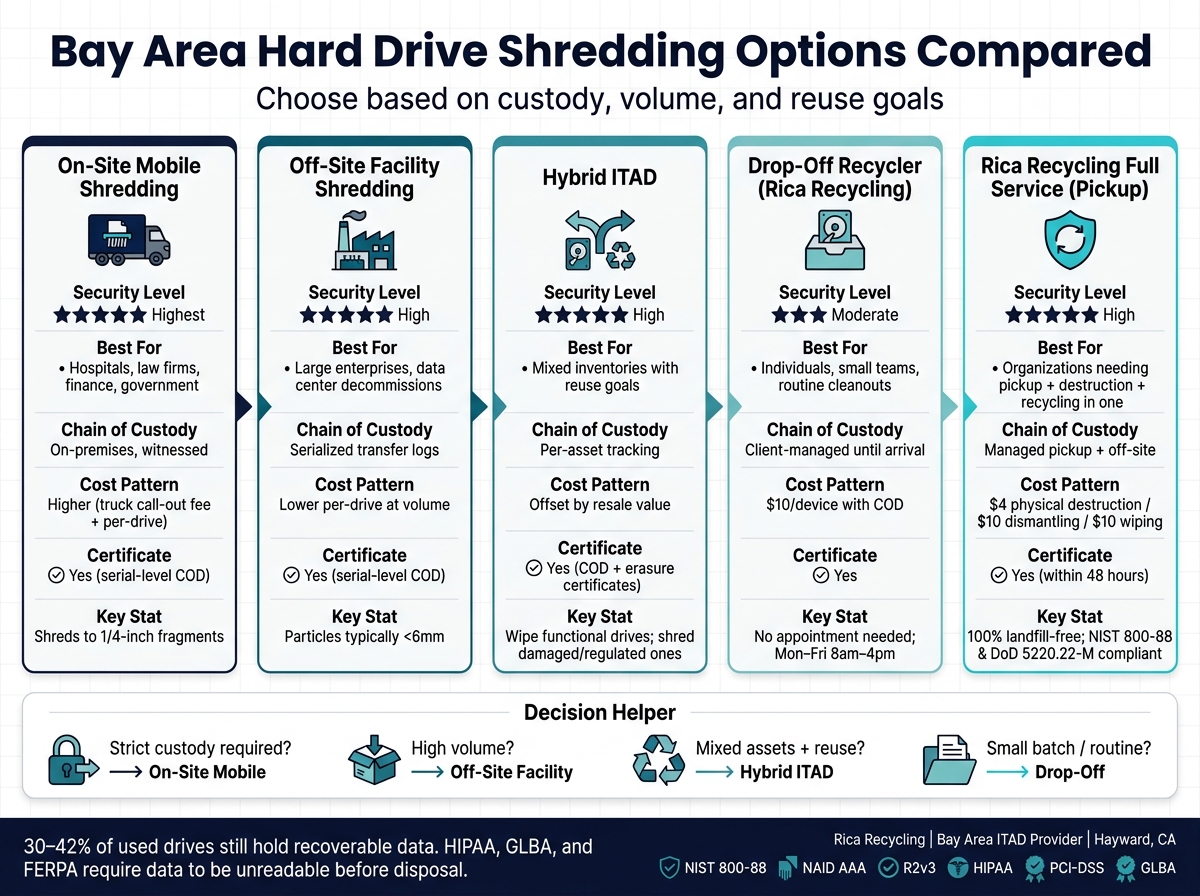
Bay Area Hard Drive Shredding Options: Side-by-Side Comparison
Quick Comparison
Option | Best for | Main tradeoff | Typical cost pattern |
|---|---|---|---|
Rica Recycling | Pickup or drop-off with destruction and recycling in one place | Off-site path may not fit strict no-transport rules | Listed per-device pricing, plus pickup based on job |
On-site mobile shredding | High-security cases | Truck fees and scheduling | Higher for small jobs |
Off-site facility shredding | Bulk loads | Drives travel intact before destruction | Lower per drive at volume |
Hybrid ITAD | Mixed assets with reuse goals | More planning and sorting | Cost can be offset by resale |
Drop-off recycler | Small batches | You manage transport and custody until handoff | Simple per-device pricing |
A few details stand out from the article. Rica lists $4 per device for physical destruction, $10 for dismantling, and $10 for 7-pass data wiping, while its drop-off destruction section cites $10 per device with a certificate. The article also points to Bay Area pickup and turnaround windows that are often 1–3 business days, with destruction records often sent within 48 hours.
So if I were narrowing options fast, I’d use this rule:
pick on-site for strict control,
pick off-site for volume,
pick hybrid for mixed fleets,
pick drop-off for small jobs.
That’s the whole decision in plain English.
1. Rica Recycling
For Bay Area organizations that need pickup, destruction, and paperwork in one place, Rica Recycling is a local choice. Rica Recycling is a Hayward-based electronics recycler and ITAD provider serving the San Francisco Bay Area. It offers secure pickup, certified data destruction, and documentation as part of the same process.
Security
Rica offers physical destruction, hard drive dismantling, and 7-pass data wiping. Each service includes a Certificate of Destruction. [2][7][9]
Compliance
Rica says its sanitization process aligns with NIST 800-88 and DoD 5220.22-M (E). It also supports HIPAA, PCI-DSS, GLBA, SOX, and FACTA requirements. [1][7][8]
Logistics
You can drop off items at 27105 Industrial Blvd, Hayward, CA 94545, Monday through Friday, 8:00 a.m.–4:00 p.m. Pickup is available across the Bay Area, and Certificates of Destruction are usually issued within 48 hours. [1][2] That setup also plays a part in pricing.
Cost
Rica lists physical destruction at $4 per device, hard drive dismantling at $10, and data wiping at $10. Standard e-waste drop-off is free. Pickup pricing depends on volume, location, and the scope of service. [2][9]
Destruction Method | Price per Device | Certificate Included | Hardware Reusable |
|---|---|---|---|
Physical destruction | $4 | Yes | No |
Hard drive dismantling | $10 | Yes | No |
Data wiping (7-pass) | $10 | Yes | Yes |
2. On-site mobile hard drive shredding services
On-site mobile shredding means a destruction truck comes to your location and destroys the drives before they ever leave the site. The big draw is pretty simple: destruction happens before transport, so chain of custody stays tighter. For healthcare practices, law firms, financial institutions, and other Bay Area organizations with strict internal security rules, that can make a big difference.
Security
That tighter control also strengthens security. Destruction happens on-site, often where staff can watch it. Some high-security units shred media into 1/4-inch fragments, which meets NSA/CSS EPL and NIST 800-88 Destroy standards and makes data recovery infeasible.[10][4] Most providers can also destroy SSDs, but it’s smart to confirm the exact process before scheduling.
Compliance
A good on-site provider should give you an itemized Certificate of Destruction that lists each drive’s serial number. That gives you a clean audit trail if questions come up later. It also helps to look for vendors with NAID AAA certification, which shows their processes are audited by an outside party.[11]
Your vendor should also line up with the rules your organization has to follow, such as:
HIPAA
PCI DSS
GLBA
Logistics
In the Bay Area, scheduling usually takes 1 to 3 business days.[1] Mobile units can also visit more than one location, which helps if your company has offices spread out across the region.
That said, on-site service isn’t always the best fit. Restricted loading zones, tight building access, or a very small number of drives can make a truck visit feel like overkill.
Cost
On-site mobile shredding usually includes a truck call-out fee plus per-drive pricing.[12] Because of that, it tends to make the most sense when you have enough drives to justify the visit. If you only have a small batch, the math can get a little rough.
It usually costs more than drop-off service or bulk off-site processing. You’re paying extra for convenience, lower transport risk, and immediate destruction records. A common-sense approach is to use on-site shredding for your most sensitive drives and save lower-cost options for assets with less risk. For smaller volumes, off-site destruction is usually the cheaper route.
3. Off-site facility hard drive shredding services
If you don't need witnessed destruction, off-site processing can cut costs while still keeping the chain of custody in place. The basic setup is simple: your drives are picked up, moved to a central facility, and destroyed there with industrial equipment.
The upside is pretty clear. You usually get a lower price per drive and better throughput for large batches. The downside is just as clear: the destruction happens out of sight.
Security
The main risk with off-site shredding is the transit window. Your drives leave the building intact, which means transport controls matter a lot.
A solid provider should use:
Tamper-evident containers
Serialized tags
GPS-tracked vehicles
Restricted access
Surveillance
Once the drives arrive at the facility, industrial shredders reduce them to particles that are typically smaller than 6 mm. That lines up with NIST SP 800-88 Destroy guidance and makes recovery infeasible.[15]
Compliance
A reputable off-site provider should give you a Certificate of Destruction that lists each drive's serial number, destruction date, method used, and facility location. That paperwork isn't just nice to have. It's part of the audit trail.
Also check for NAID AAA certification. That means the provider's staff and processes are audited by a third party. If you're in California, make sure the provider also aligns with SB 20 e-waste rules. If your organization falls under HIPAA, ask for a signed Business Associate Agreement (BAA). If you're in finance, confirm the provider's controls support PCI-DSS and GLBA requirements. Keep CoDs and chain-of-custody records based on your industry's record-retention rules.[14][17]
Logistics
Bay Area providers usually offer scheduled pickups on a weekly, monthly, or quarterly basis. Many also handle on-demand pickups for larger cleanouts. If you only have a small batch, drop-off may be the easier route.
Processing turnaround is usually 1 to 3 business days, and Certificates of Destruction are often issued within 48 hours after completion.[1] For teams that want better pricing, batching drives into quarterly or semiannual runs is often the sweet spot.
Cost
Off-site shredding is usually cheaper when you're dealing with volume. Ask about discounts for large batches, because that's where this model tends to save the most money.
For smaller loads, or for mixed collections that include more than just drives, hybrid ITAD services may be a better fit.
4. Hybrid ITAD data destruction services
Hybrid ITAD sits in the middle for mixed drive inventories. It wipes drives that can still be reused and shreds the ones that shouldn't stay in circulation. Instead of sending every drive down the same path, it sorts assets by sensitivity and condition.
Here’s the basic idea: functional drives from standard workstations can be wiped with NIST SP 800-88-compliant methods and then resold or reused. Damaged drives, drives that fail wiping, or drives from regulated systems are physically shredded.[24][25][26]
Security
For security, the split is pretty simple. Reusable drives are wiped and verified. Damaged or higher-risk drives are shredded.
Drives from systems that handled regulated data - such as SANs with patient records or financial data - are wiped, verified, and shredded if needed. That process reduces them to small fragments, which makes recovery infeasible.[21][22]
Some organizations want tighter control from start to finish. In those cases, providers may offer on-site sanitization and shredding before any asset leaves the building. That cuts transit risk and gives IT and compliance teams more peace of mind.[19][20]
Compliance
Hybrid ITAD works well for organizations dealing with HIPAA, PCI DSS, FERPA, or California's Electronic Waste Recycling Act (SB 20). One reason is simple: the records can cover both sanitization and destruction in a single audit trail.[5][7][19]
Clients should expect device-level records tied to:
Serial number
Method
Date
Device type
They should also expect chain-of-custody logs that track each handoff from decommissioning through final disposition. That full paper trail matters. In a HIPAA or PCI DSS audit, a certificate by itself may not be enough without end-to-end documentation.[17]
Logistics
Most hybrid ITAD programs are flexible. Sensitive drives can be shredded on-site, while the rest of the hardware is picked up for off-site wiping and remarketing.[5][22][13]
That setup fits mixed inventories well, especially when one batch of equipment doesn’t all carry the same level of risk. Scheduling usually lines up with IT refresh cycles or data center maintenance windows. Providers can often handle both recurring pickup schedules and one-time cleanouts.
Cost
Hybrid ITAD can cut costs by keeping resale value on drives that still have life left in them. In most cases, wiping a functional drive costs less per unit than shredding it.[18][23]
When you ask for quotes, have providers separate the charges for data destruction, logistics, and asset recovery. That makes it much easier to see what you're paying for and where the value is. If you're retiring servers or enterprise networking gear, resale revenue may offset part of the total service cost.[5][18][23]
If your load is small or the risk level is low, drop-off recyclers are the simpler next option.
Method | Hardware Outcome | Cost Efficiency | Best For |
|---|---|---|---|
Certified wiping | Reusable / resalable | High | Functional drives |
Physical shredding | Scrap metal | Medium | Damaged drives, regulated data |
Hybrid (wipe + shred) | Mixed | Balanced | High-volume, tiered sensitivity |
5. Drop-off electronics recyclers with drive destruction
For small batches, especially when your team can move the equipment on its own, drop-off is usually the easiest hard drive destruction option. You bring in the devices yourself - loose drives, laptops, servers, and other electronics - and the facility takes care of the destruction and paperwork.
Rica Recycling's Hayward facility at 27105 Industrial Blvd accepts electronics Monday through Friday, from 8 a.m. to 4 p.m. You don't need an appointment for walk-in drop-offs, and general e-waste drop-off is free.[2][3]
Security
The tradeoff is pretty clear: the drives remain intact until they arrive at the facility. That means your main risk window is before destruction, during handling and transport.
To cut that risk, it helps to:
Encrypt drives while they're still in use
Remove encryption keys before decommissioning
Keep an internal chain of custody during transport
Use sealed, locked containers
The main issue here is custody before destruction, not the destruction method itself.
You should also ask whether the recycler follows NIST SP 800-88 and make sure serial numbers appear on the Certificate of Destruction.[1]
Compliance
Using drop-off at a certified recycler can help support California e-waste rules and federal data-disposal requirements, as long as proper destruction records are issued.[6] Rica Recycling also states that it maintains a 100% landfill-free policy and uses R2-certified downstream processors.[5][27]
Logistics
Drop-off tends to work best for small to medium batches. If you've got a mixed load, that's usually fine. HDDs, SSDs, flash drives, backup tapes, laptops, tablets, and servers are generally accepted, with each type of media sent to the right destruction process.
Cost
Per-unit pricing makes drop-off easy to budget. Rica Recycling charges $10 per device for destruction with a certificate.[2][3] For smaller volumes, that's pretty simple and helps you avoid the minimum fees that mobile shredding trucks often charge.
Service | Rica Recycling (Hayward) |
|---|---|
E-waste drop-off | Free |
Physical hard drive destruction + COD | $10/device |
Documentation only | $10/certificate |
Appointment required | No |
Hours | Mon–Fri, 8 a.m. – 4 p.m. |
Turnaround | 1–3 business days |
At that point, the decision comes down to three things: custody, documentation, and batch size.
Security, Compliance, and Practical Tradeoffs
For Bay Area organizations, this choice usually comes down to three things: custody, compliance, and volume.
Start with two certifications. Check for NAID AAA for secure destruction and R2v3 for responsible recycling and downstream handling. The best vendors often have both, since destruction and recycling follow different compliance paths.[28][29]
Then ask one direct question: Which NIST SP 800-88 Rev. 2 path do you use for each asset - Clear, Purge, or Destroy? If a vendor can't clearly name its destruction standard, don't move forward with that bid.[16][15]
Here’s where the options differ in day-to-day use:
Criteria | On-Site Mobile | Off-Site Facility | Hybrid ITAD | Drop-Off |
|---|---|---|---|---|
Security | Highest - witnessed | High - custody-dependent | High - wipe + destroy | Moderate - client-managed until handoff |
Chain of custody | On-premises, immediate | Serialized transfer logs | Per-asset tracking | Client-managed until arrival |
Compliance fit | Healthcare, legal, finance, public agencies | Large volumes, recurring needs | Mixed inventories with reuse goals | Lower-risk, small-volume |
Logistics | Vendor comes to you | Scheduled pickup | Multi-step: inventory, wipe, sort, shred | You deliver |
Cost | Lower efficiency - mobilization fees | Medium - better at volume | Highest - value recovery offsets cost | High for small jobs |
Documentation | COD with serial numbers | COD with serial numbers | COD plus per-asset erasure certificates | COD available |
The next section breaks these tradeoffs into plain pros and cons.
Pros and Cons
These options mostly come down to custody, volume, and one practical issue: does reuse still matter, or do you want everything destroyed?
Option | Pros | Cons | Best Fit |
|---|---|---|---|
Rica Recycling (ITAD + landfill-free e-waste) | 100% landfill-free; secure data destruction; IT asset recovery; single pickup/drop-off program for drives and e-waste | Off-site processing may not fit strict "no drives leave the building" policies | Organizations that want secure destruction combined with electronics recycling, sustainability, and IT asset recovery |
On-site mobile hard drive shredding | Witnessed destruction on-site; strong chain of custody; can handle multiple media types | Higher cost for small batches; minimum volumes may apply; requires truck access and scheduling | Hospitals, financial institutions, and government agencies with strict witnessed-destruction or no-offsite policies |
Off-site facility hard drive shredding | Efficient for large volumes; documented chain of custody; Certificates of Destruction | Drives leave your site before destruction; transit adds some risk; you usually cannot witness the shredding | Large enterprises and data center decommissions with high drive counts |
Hybrid ITAD data destruction services | Inventory, certified destruction, reuse, and recycling; detailed audit reports | More complex to coordinate; requires asset lists and project planning; some vendors use subcontractors for part of the process | Organizations running structured hardware refresh cycles that need asset tracking and documentation |
Drop-off electronics recyclers with drive destruction | Convenient for low volumes; straightforward intake; accepts a range of electronics and appliances alongside drives | Limited to location hours and drop-off windows; client retains custody until drop-off; not ideal for strict chain-of-custody or high-volume projects | Individuals, small teams, or organizations clearing out devices gradually |
A simple way to narrow the field is to look at three things:
Custody rules: Do drives have to stay on-site until they’re destroyed?
Batch size: Are you dealing with a handful of drives or a full room of retired gear?
Reuse goals: Do you want asset recovery value, or is total destruction the only goal?
Once you sort those out, the choice gets a lot clearer. Then you’re down to one last call: which option matches your security rule and your volume?
Conclusion
The right hard drive shredding method comes down to security needs, compliance, volume, and whether reuse matters. In plain English, three things drive the decision: custody, volume, and reuse.
Here’s how that usually plays out in the real world:
Use on-site shredding when strict custody is the top concern.
Use off-site shredding for lower-cost, high-volume work.
Use hybrid ITAD for mixed inventories.
Use drop-off for small, routine cleanouts.
For audit support, keep your Certificates of Destruction, chain-of-custody logs, and recycling records.
Rica Recycling is a Bay Area option for organizations that want secure destruction, asset recovery, pickup, or drop-off in one program.[1][2]
Pick the method that fits your risk level, volume, and documentation needs, then keep the records.
FAQs
How do I choose between on-site and off-site shredding?
Choose based on your security and compliance needs. Off-site shredding works well for routine cleanouts when you want a convenient, lower-cost option. Your material is moved through secure transport, tracked with a full chain of custody, and finished with a Certificate of Destruction.
On-site shredding is the better fit for high-security settings or cases where witnessed destruction is required. It gives you immediate visual confirmation right at your location. Both methods meet NIST 800-88 and DoD standards.
When should I wipe drives instead of shredding them?
Choose certified data wiping if you want to keep hardware in use, recover some value, or repurpose devices instead of tossing them out. Wiping leaves the device intact by overwriting the data, which makes it a solid choice for routine business use or lower-risk internal information.
Use shredding when a drive is damaged, doesn’t work, or can’t be erased. It also makes sense for highly sensitive or regulated data that calls for immediate, irreversible destruction.
What paperwork should I ask for after destruction?
Ask for a Certificate of Destruction (COD) to confirm that the data was wiped or destroyed.
If you need paperwork for records, audits, or compliance, request:
device inventory reports with serial numbers and model names
chain-of-custody logs that show transfer dates and transportation details
For more complex or high-security projects, it also makes sense to ask for photo or video documentation of the destruction process.