
Donating old business electronics is a smart move for reducing waste, helping your community, and even saving on taxes. Here's the quick breakdown:
- Environmental Impact: Recycling 1 million laptops can save energy equivalent to powering 3,500 homes for a year. Donating extends device lifespans and reduces waste.
- Social Impact: With 82 million Americans lacking home computers, your donations can help bridge the digital divide.
- Tax Benefits: Businesses can claim deductions - up to the fair market value for individuals or the tax basis for corporations - if devices meet IRS standards.
Steps to Donate:
- Evaluate Devices: Ensure they’re functional and meet donation standards. Broken devices should be recycled instead.
- Secure Data: Erase all sensitive information using proper methods or certified data destruction services.
- Choose a Partner: Work with 501(c)(3) organizations or certified recyclers for compliance and impact.
- Prepare Devices: Include accessories like chargers and document everything for tax purposes.
Key Tip: Always confirm the charity’s requirements and IRS rules to maximize your donation’s value.
This guide covers everything from assessing devices to securing data and finding reliable partners. Keep reading to make your donation process smooth and impactful.
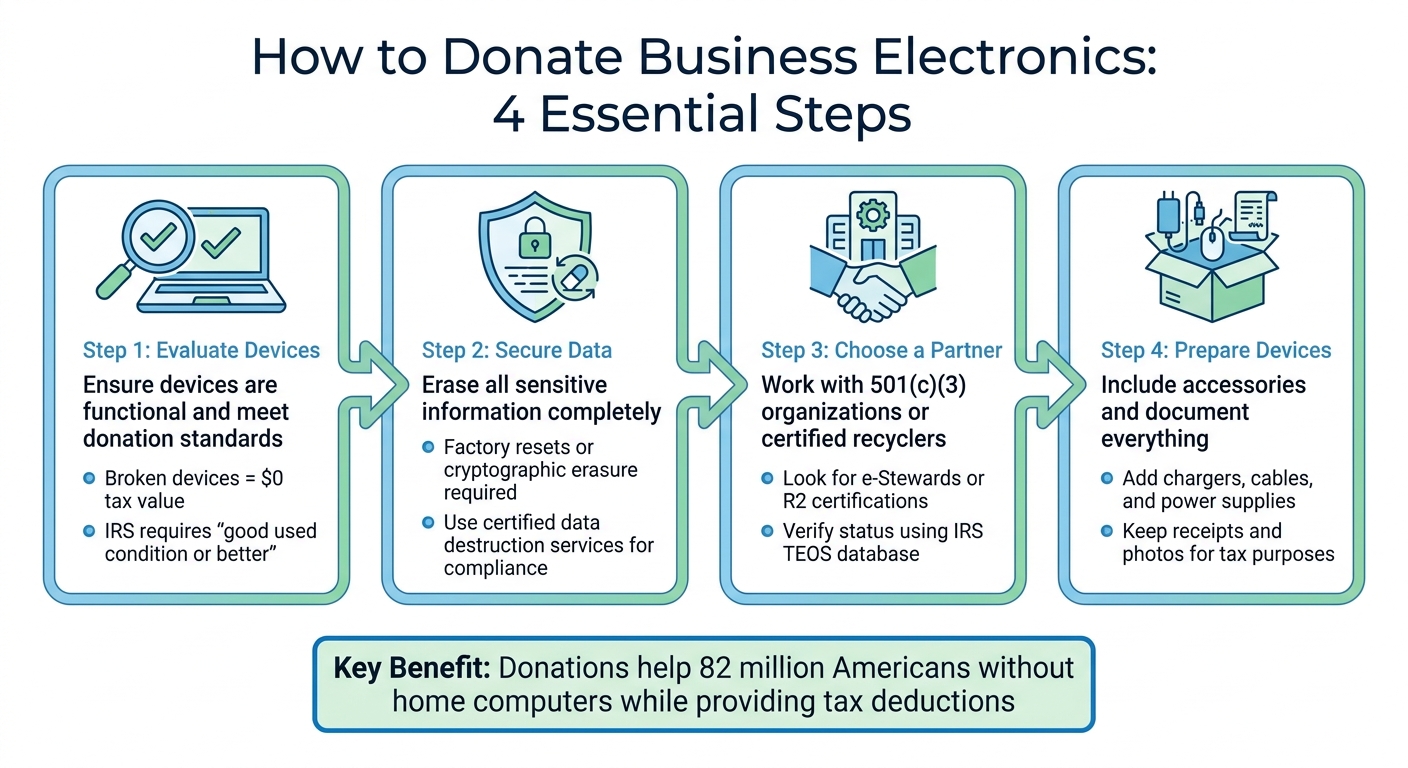
4-Step Process for Donating Business Electronics
Donate Electronics, Get Tax Deductions! Free Service! #shorts
sbb-itb-855056e
Assessing Electronics for Donation
Before you toss out those old computers, take a moment to figure out what's worth donating and what needs to hit the recycling bin. For a tax deduction, the IRS requires donated electronics to be in "good used condition or better." That means the device should turn on, work properly, and have all its key components intact.
Here’s the deal: if a device doesn’t work, its Fair Market Value is $0 for tax purposes. As stated in the Electronics Donation Value Guide 2025–2026:
The spread between a working device and a non-working one isn't 10 or 20 percent - it's everything. Condition and functionality are the entire ballgame.
In other words, a broken device doesn’t just lose some value - it loses all of it, along with your chance for a deduction.
Age is another factor. A 2–4-year-old laptop might still be valued between $100 and $350 for donation purposes, while anything older than five years could drop to $30 or less. Plus, older devices may not meet the software compatibility needs of most recipients. Similarly, a four-year-old smartphone typically holds only 10% to 20% of its original retail price.
Carefully evaluating your electronics helps ensure they meet both donation standards and IRS rules for tax benefits.
Testing Devices for Basic Functionality
Start with a simple "power-on" test. Check if the device boots fully into its operating system. For laptops and phones, confirm the battery can hold a charge. Devices that only work when plugged in often don’t meet the "good condition" standard.
Inspect all essential parts. Test every key on the keyboard to ensure none are missing or broken. Open and close laptop hinges to check they’re secure. Look for screen damage, like cracks or dead pixels. If a device has a shattered screen, broken hinges, or missing keys, it’s better off in the recycling pile.
Make sure to include original accessories like chargers, power cords, and remotes. These extras not only improve the value of your donation but also make it more likely to be accepted by charities, many of which won’t take devices without their power supplies.
Once these checks are complete, you can start sorting devices to figure out which ones are ready to donate and which need a little work.
Identifying Devices That Need Minor Repairs
Some electronics fall into a gray area - not fully functional but not entirely useless either. Create an inventory to categorize each item as "working", "needs repair", or "non-functional." This helps you decide what’s worth fixing.
Minor repairs can sometimes turn a worthless device into a valuable donation. For example, replacing a dead battery or reinstalling the operating system could boost a device’s value from $0 to over $100 in tax deduction potential. However, check the requirements of the organization you’re donating to. Groups like World Computer Exchange, for instance, only accept fully working devices.
If a device is completely broken or outdated, skip the repairs and send it to a certified recycler for pickup. Repairs are only worth it if they’re inexpensive and bring the device up to donation standards. For high-end items in poor condition, you might still claim a deduction above $500 if you get a qualified appraisal.
Separating Items for Donation vs. Recycling
Use two main criteria - age and functionality - to decide where each device goes. Devices less than three years old often have resale value and might be better sold through buyback programs. Older but functional devices (3–5 years old) are great candidates for donation. Anything broken, obsolete, or non-functional should go straight to recycling.
| Disposal Path | Best For | Key Consideration |
|---|---|---|
| Resale | Newer equipment (under 3 years old) | Maximizing return on investment |
| Donation | Functional, older equipment | Helping the community |
| Certified Recycling | Obsolete or broken gear | Ensuring proper disposal |
Before you finalize your sorting, double-check the policies of the charity you’re donating to. Some organizations won’t accept older items like CRT monitors or bulky office copiers because of the high costs to dispose of them. A quick call can save you time and ensure your donations actually make a difference.
Tax Benefits of Donating Business Electronics
Donating business electronics to qualified 501(c)(3) nonprofits can help reduce your tax bill, but the rules depend on your business structure. For corporations, deductions are typically limited to the tax basis of the donated item - meaning the original cost minus any depreciation you've already claimed. On the other hand, individual donors and sole proprietors can base their deductions on the fair market value (FMV) of the electronics at the time of donation.
It's important to note that electronics must generally be in good used condition to qualify for a deduction. If an item valued at over $500 isn't in good condition, you can still claim a deduction, but you'll need to include a qualified appraisal with your tax return. For C-corporations, there's an extra benefit: under Section 170(e)(3), they can deduct up to twice the tax basis for donated inventory.
Before donating, confirm the charity's 501(c)(3) status using the IRS Tax Exempt Organization Search (TEOS) at IRS.gov/TEOS. Only donations to qualified organizations - like 501(c)(3) nonprofits, religious groups, or educational institutions - are deductible. If you receive something in return for your donation, such as event tickets, you can only deduct the portion of your donation that exceeds the fair market value of what you received.
Calculating Fair Market Value Deductions
The IRS defines FMV as the price a willing buyer and seller would agree upon without pressure, based on full knowledge of the item's condition and other relevant facts. For used electronics, FMV is usually based on the current resale value rather than the original purchase price.
To estimate FMV, you can check comparable sales on platforms like eBay or refer to valuation guides from organizations like the Salvation Army or Goodwill. It's a good idea to take photos of the electronics before donating them. This documentation can be helpful if the IRS questions your claimed deduction. As Stephen Fishman, J.D., explains in Nolo:
The basic rule is that you may deduct no more than the property's 'fair market value' at the time of the donation.
Be careful not to overstate the value of your donation. The IRS imposes penalties for overstatements - 20% if the value is overstated by 150%, and 40% if it reaches 200% or more. If you're unsure about the value of a high-ticket item, consider hiring a qualified appraiser to avoid potential issues.
Once you've determined the FMV, make sure you gather the necessary paperwork to stay compliant with tax regulations.
Documentation Required for Tax Compliance
The documentation required for your donation depends on its value. For contributions of $250 or more, you'll need a contemporaneous written acknowledgment (CWA) from the charity. This letter should include the organization's name, the donation date, a description of the electronics, and a statement about whether you received any goods or services in return.
| Deduction Amount | Documentation Needed | IRS Form Required |
|---|---|---|
| Less than $250 | Receipt with the charity's name, donation date, description of the item, and FMV | None |
| $250 – $500 | CWA | None |
| Over $500 – $5,000 | CWA, plus records of when you acquired the item and its cost basis | Form 8283, Section A |
| Over $5,000 | CWA, plus a qualified appraisal | Form 8283, Section B |
| Over $500,000 | CWA, appraisal, and appraisal attached to your tax return | Form 8283, Section B |
If your total noncash donations for the year exceed $500, you'll need to file IRS Form 8283. For any single item - or group of similar items - valued at over $5,000, a formal qualified appraisal is mandatory, and you'll need to complete Section B of Form 8283 to meet IRS requirements.
Protecting Data Before Donation
Before donating business electronics, it’s crucial to completely erase all data. Simply deleting files or reformatting drives isn’t enough - data can still be recovered, leaving your business vulnerable to legal issues, fines, and potential damage to your reputation.
Businesses are also required to follow data privacy laws like the FTC Disposal Rule, HIPAA, and GDPR. These regulations outline specific procedures for securely destroying sensitive information before devices are donated or discarded. Skipping this step could lead to violations, lawsuits, and other serious consequences.
To stay organized and maintain accountability, create a detailed inventory of the equipment you plan to donate. This should include information like asset tag numbers, serial numbers, device types, brands/models, and the condition of each item.
How to Securely Delete Data from Devices
The method for erasing data depends on whether the device will be reused or recycled. If it’s being refurbished, software wiping is a good option. This process overwrites every sector of the drive with random data multiple times, ensuring the information is unrecoverable while keeping the drive functional. For devices that are no longer usable, physical destruction is the most secure approach.
Here’s how to wipe data from common devices:
- Windows PCs: Navigate to Settings > System > Recovery > Reset this PC. Choose "Remove everything" and "Clean the drive."
- Mac computers: Use the "Erase Assistant" for Apple Silicon or T2-equipped models, or Disk Utility for older Intel Macs.
- iPhones and iPads: Go to Settings > General > Transfer or Reset > Erase All Content and Settings. This method uses cryptographic erasure.
- Android devices: Open Settings > General Management > Reset > Factory Data Reset. Don’t forget to remove SIM and microSD cards.
- Printers: Perform a factory reset through the Settings or Maintenance menu to erase stored Wi-Fi passwords and document histories.
[Steps are based on secure data deletion guidelines (see).]
| Method | Best For | How It Works | Limitations |
|---|---|---|---|
| Software Wiping | Resale or Reuse | Overwrites every sector with random data | Time-intensive; requires a working drive |
| Degaussing | End-of-life HDDs | Uses a magnetic field to scramble data | Ineffective on SSDs; renders drives unusable |
| Physical Shredding | High-security/Obsolete | Industrial shredders grind media into fragments | Destroys hardware resale value |
Before starting any reset, make sure to sign out of cloud services (e.g., Apple ID, Google, Microsoft) and remove linked payment methods. This prevents unauthorized access after donation.
For peace of mind, you might also consider professional services to ensure thorough data destruction.
Why Use Certified Data Destruction Services
Professional data destruction services offer an added layer of security and compliance that DIY methods can’t guarantee. These services provide a Certificate of Data Destruction, which includes key details like serial numbers, destruction methods, dates, and the authorized vendor.
"A Certificate of Data Destruction is your auditable proof of due diligence. It documents the serial numbers of the destroyed devices, the method used, the date of destruction, and the authorized vendor, protecting your business from future claims of non-compliance." - Beyond Surplus
Certified services adhere to the NIST SP 800-88 federal standard for media sanitization, which is much stricter than basic factory resets. Look for vendors with R2 (Responsible Recycling) and RIOS (Recycling Industry Operating Standards) certifications. These certifications ensure regular audits and guarantee that data is destroyed before materials reach secondary markets.
For businesses in the Bay Area, Rica Recycling offers certified data destruction services. They comply with California e-waste laws and federal standards, handling large-scale pickups and providing serialized certificates for every device processed. They also offer on-site shredding, allowing you to witness the physical destruction of hard drives before the equipment leaves your premises.
Certified services are especially helpful for bulk donations, managing hundreds of devices with detailed asset tracking and chain-of-custody documentation.
How to Donate Electronics: Step-by-Step Process
Once you've assessed your device's condition and considered any potential tax benefits, it's time to dive into the donation process. Here's how to make it happen.
Finding Reputable Donation Partners
Start by ensuring the organization you choose is a registered 501(c)(3), as this is necessary to claim tax deductions. Look for donation partners that hold certifications like e-Stewards or R2 (Responsible Recycling). These certifications confirm adherence to ISO 14001 standards and help prevent the illegal dumping of hazardous waste.
You can use trusted databases or manufacturer take-back programs to find verified partners. It's worth noting that 28 states and Washington, D.C. have laws requiring manufacturers to accept old electronics for recycling or donation.
Make sure your selected partner has clear policies on data security. Reliable organizations often require donors to wipe data from devices before donating or offer certified destruction services. Keep in mind that many organizations, such as the World Computer Exchange, only accept devices that are in working condition. For non-functional electronics, certified e-waste recyclers are the better option.
Once you've identified a trustworthy partner, it's time to prepare your devices for donation.
Preparing Electronics for Donation
Proper preparation ensures your donation meets compliance standards and is ready for use. Start by removing any batteries, particularly lithium-ion ones, from your devices. These batteries require special handling and should never go into regular recycling bins. Programs like Call2Recycle can help you dispose of them safely.
Next, check that each device is functioning properly and include all necessary accessories, like chargers or cables, to maximize their value. Clean the devices thoroughly and create a detailed inventory. Your inventory should include asset tag numbers, serial numbers, device types, brands/models, and their condition.
To streamline the process, gather all equipment in a secure, easily accessible location - such as near a loading dock or an exit. Assign someone to oversee the inventory, coordinate pickups, and manage any required documentation.
Once your devices are ready, the next step is arranging for delivery or pickup.
Scheduling Pickup or Drop-Off
Reach out to the recipient organization ahead of time to schedule a delivery or confirm whether they offer free pickup services. Keep in mind that logistics costs may vary based on factors like travel distance, the volume of equipment, and the complexity of the site.
For donations valued over $250, make sure to secure a written receipt. This receipt should include the organization's name, a description of the donated equipment, and the date of the donation. Additionally, retain original sales receipts to help determine the fair market value of your items for tax purposes. Generally, individual donors can deduct the fair market value of donated items, while corporate donors are typically limited to the tax basis of the property. However, exceptions may apply under Section 170(e)(3).
Rica Recycling for Bay Area Businesses

Once you've prepared your electronics for donation, it's essential to find a local, compliant solution for recycling and recovery. For businesses in the San Francisco Bay Area, Rica Recycling offers certified electronics recycling and IT asset recovery services that align with donation and sustainability goals. With two decades of experience, they’ve worked with enterprises, schools, government agencies, and nonprofits across San Francisco, Oakland, and San Mateo, simplifying the electronics recycling process.
Services Offered by Rica Recycling
Rica Recycling manages a wide variety of devices, including computers, servers, monitors, printers, cell phones, and cables. Their IT asset recovery service helps businesses recoup value from retired equipment through secure resale or recovery methods. To ensure sensitive data is handled appropriately, they provide secure data destruction and issue Certificates of Data Destruction to meet compliance requirements.
For larger electronic appliances, Rica Recycling offers specialized recycling services. There’s a $50 fee per item for drop-offs, while standard e-waste items can be dropped off free of charge at their Hayward, CA facility.
Rica Recycling's Environmental Practices
Rica Recycling is committed to a landfill-free approach, ensuring all electronics are processed through eco-friendly channels.
"To encourage the world to raise their standards of reduction, recycling, and reuse through providing economic and efficient ways for individuals and companies to safely and responsibly recycle electronics."
This zero-waste philosophy aligns with California's stringent e-waste regulations, making Rica Recycling a reliable partner for businesses navigating state disposal laws. Their environmentally responsible practices, paired with secure data destruction services, support the compliance and sustainability principles discussed in this guide.
Pickup and Drop-Off Options
Rica Recycling provides flexible options for businesses. For larger-scale cleanouts or recurring recycling needs, they offer e-waste pickup services tailored for offices, schools, and commercial spaces. This service simplifies logistics while ensuring regulatory compliance. For smaller recycling needs, businesses can drop items off at their Hayward facility. Be sure to check their accepted items list and request a data destruction certificate for any storage devices.
These convenient options make it easy to responsibly recycle electronics while seamlessly integrating sustainability into your donation efforts.
Conclusion
This guide has walked you through the entire process of donating business electronics - from assessing devices to securely destroying data. Successfully donating electronics hinges on three key actions: confirming device functionality, safeguarding sensitive information, and partnering with certified organizations. Keep in mind that for IRS deductions, devices must be in good working condition; non-functional items hold no value for tax purposes. Ensuring devices are operational helps maximize both your tax benefits and the positive impact on your community.
Data security is non-negotiable. Simply deleting files isn't enough - factory resets or cryptographic erasures are necessary. Additionally, physical storage components like SIM cards and microSD cards must be removed before handing over devices. For businesses managing regulated data, certified data destruction services provide the compliance proof needed to meet legal standards.
Focusing on reuse instead of recycling offers the highest environmental benefit. Did you know that about 75% of a computer's fossil fuel use happens during manufacturing? Extending a device's life by five years has a far greater environmental impact than recycling it prematurely. By refurbishing and donating equipment less than five years old, you reduce fossil fuel consumption and contribute to local programs. Older or broken devices, however, should be sent to certified recyclers for proper disposal.
Bay Area businesses can rely on Rica Recycling for secure data destruction, IT asset recovery, and eco-friendly operations. Their convenient pickup and drop-off services simplify the process while ensuring compliance with California's e-waste regulations. Whether you're donating laptops to schools or recycling outdated servers, the right partner can turn a daunting task into a seamless, value-driven solution.
Finally, document all donations thoroughly. Save receipts, take photos of device conditions, and file Form 8283 for contributions exceeding $500. Proper documentation not only ensures compliance but also reinforces your commitment to responsible electronics management. By following these steps, your business can donate electronics with confidence, protecting both your assets and sensitive data along the way.
FAQs
What’s the safest way to wipe data before donating work devices?
The most secure method to clear data before donating work devices is through certified data erasure using dedicated software. This process guarantees that all sensitive information is completely removed while leaving the device operational. For businesses, it's wise to use tools that align with standards such as NIST 800-88, GDPR, or HIPAA, ensuring thorough and compliant data removal. Physical destruction should only be considered if the device is no longer usable, as certified data wiping helps minimize e-waste.
How do I value donated electronics for a tax deduction without overestimating?
To determine the value of donated electronics for a tax deduction, you’ll need to use their fair market value (FMV) - essentially, what they would sell for in their current used condition. Look up similar items of the same age and condition to ensure your estimate is accurate and not overstated. If the value of your donation exceeds $5,000, you might need to get an official appraisal. Be sure to keep proper documentation, like receipts or market comparisons, to back up your valuation and stay within IRS guidelines.
What documents do I need for an IRS-compliant electronics donation?
To meet IRS rules, fill out Form 8283 for noncash donations worth more than $500. If your donation exceeds $5,000 in value, you'll also need to attach a qualified appraisal. Additionally, obtain documentation from the charity, like an acknowledgment or a description of the donated electronics, to stay compliant. Make sure all substantiation requirements are satisfied for tax purposes.